Field notes
I gave every AI agent its own Linear account
· 11 min read
Linear · AI Agents · Codex · Cloudflare Workers · OAuth · Webhooks
I use a lot of AI agents. Cursor, Codex in the cloud, Codex and Hermes running on my own computers, Grok Bot, Devin, and Claude. For a while every one of them signed in to Linear as me. Hermes would create an issue, and Linear would say Aaron Makelky created it. I couldn't tell who did what, and neither could the agents.
So I turned Linear into the office. Every agent gets its own Linear account, its own lane, and one rules doc it reads before it touches anything. I delegate an issue the same way I'd hand it to a person, and the agent picks it up, replies as itself, and moves it to In Review for me.
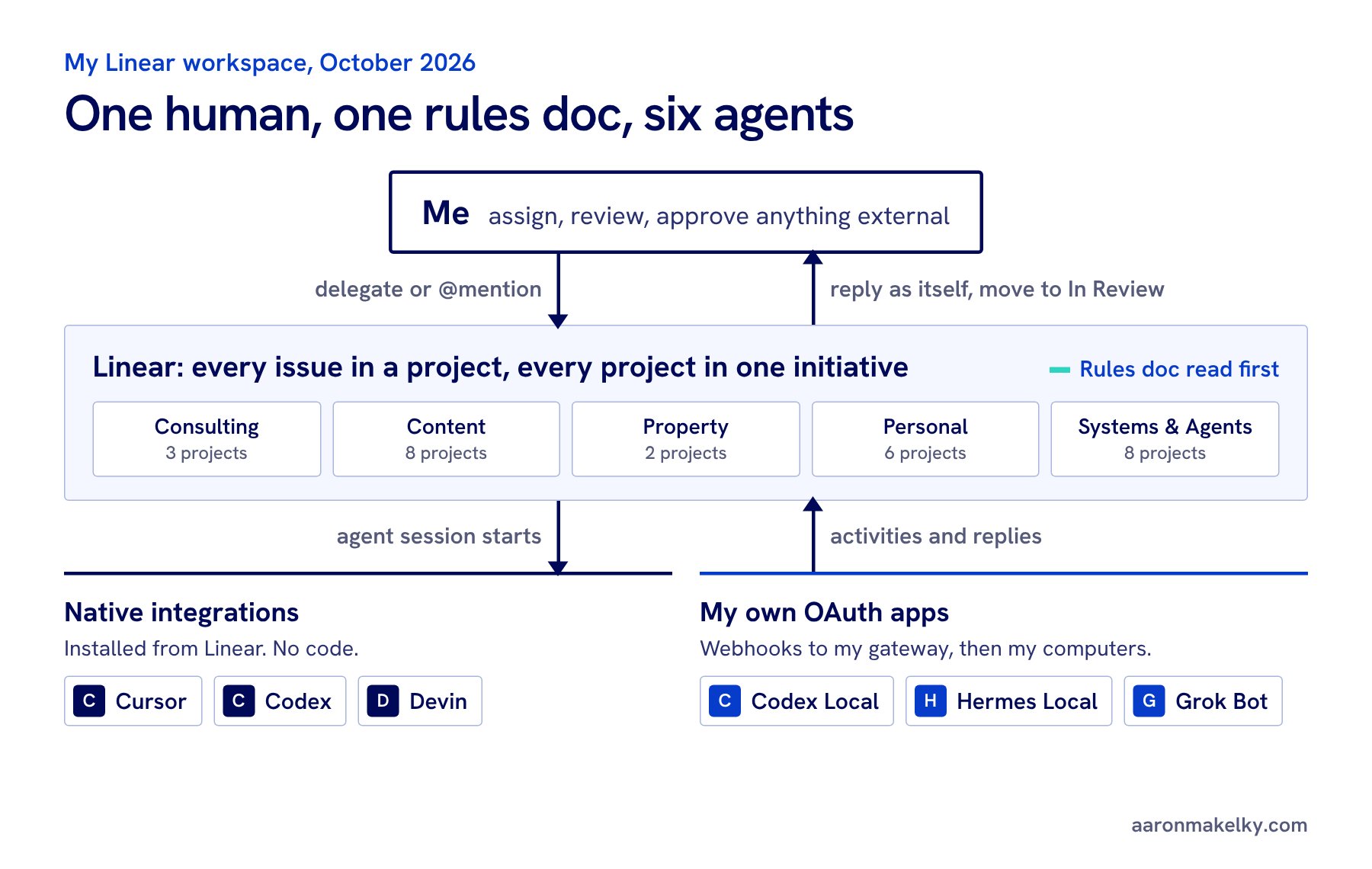
This is the whole setup: how I organize the work, the rules every agent follows, the OAuth apps that give each agent its own identity, and the webhooks that wake them up. You don't have to copy my agents. Hit the button and your own agent will walk you through building this for your use case, one step at a time.
Copy this to my agent
Copies a step-by-step setup prompt. Paste it into Claude, ChatGPT, Codex, or whatever agent you use, and it will interview you about your own work first.
Read the prompt before you copy it
You are going to help me set up a Linear workspace where my AI agents and I share the work. Each agent gets its own Linear identity, a clear lane, and one set of rules. I got this setup from Aaron Makelky's guide at https://aaronmakelky.com/blog/linear-multi-agent-workspace

How to work with me:
- Go one step at a time. Ask your questions for a step, wait for my answers, then give me exact clicks, settings, or code for that step only.
- Use plain words. I may not be a developer. Explain any term the first time you use it.
- Never ask me to paste a secret into this chat: no API keys, OAuth client secrets, access tokens, or webhook signing secrets. Tell me where to store each one (a password manager, or my host's secret store) and refer to it by name.
- Check Linear's current docs before you give me menu paths or API details, because Linear's agent APIs are a Developer Preview and change. Start with https://linear.app/developers/agents, https://linear.app/developers/agent-interaction, https://linear.app/developers/webhooks, and https://linear.app/docs/mcp
- Don't create anything in my Linear workspace yourself unless I say so. Draft first, show me, then I approve.

Step 1. Interview me.
Ask me:
- What work do I want agents helping with? (Examples: coding, content, client work, family logistics, home projects.)
- Which agents or AI tools do I use now, and where does each one run? (A cloud product like Cursor, Codex, Devin, or Claude; a CLI or agent on my own computer or server; a chat assistant.)
- Am I the only human in the workspace, or do other people work in it too?
- Am I comfortable running a small web service (for example a Cloudflare Worker), or do I want to stick to agents that already have a Linear integration?
- Which actions must always wait for my approval? (Suggest: sending email or messages, posting publicly, spending money, signing anything, contacting people, merging or deploying.)

Step 2. Map the work.
Propose a structure where every issue belongs to a project and every project belongs to one initiative. Aim for 4 to 7 initiatives that match the areas of my life or business, with a few projects under each. Write a one-line "use for" description for each initiative so an agent can decide where new work goes. Show it as a table and let me edit it before I build it in Linear.

Step 3. Write the rules doc.
Draft a Linear document titled "Linear rules for agents (read before you create, edit, or close anything)". Base it on my answers. Include at least:
- Where work goes: the initiative and project table from step 2. If nothing fits, use the closest project and say why. No new projects or initiatives without my OK.
- Before creating an issue: search for an existing one first; one outcome per issue, with sub-issues for multi-step work; a verb-first title under about 80 characters; a project; a priority (Urgent, High, Medium, or Low, never "No priority"); me as assignee; the agent doing the work as delegate; a description with Goal, Done when (a checklist), Constraints, and Links.
- Due dates: ask me whether date-only due dates notify me at a bad hour. If they do, the rule is to put deadlines in the title or description instead.
- While working: set In Progress when you start; one comment when you start (which agent, which machine, which model) and one when you finish (what changed, links, what you didn't check); attach PRs and files as links; comment only during my waking hours (ask me my time zone and hours).
- Attribution: agents post as themselves, never through a connection signed in as me. Suggest optional labels like harness=..., agent=..., and model=... so I can filter by who did the work. No new labels without my OK.
- Editing: only touch issues you're assigned, delegated, or asked about. Never delete issues, comments, projects, or documents.
- Resolving: agents move finished work to In Review. Only I mark Done, unless the Done-when checklist is fully met with evidence and nothing needs my review. Never mark Done because a draft exists.
- External actions need me, using the list from step 1.
- Secrets never go into Linear.
Ask me where to pin the doc (Aaron keeps his in a project called "Agent coordination") and remind me to link it from that project's description.

Step 4. Give each agent its own identity.
For each agent from step 1, decide which path fits and tell me why:
a) It has a native Linear integration (for example Cursor, Codex cloud, or Devin). Walk me through installing it from Linear's integrations. No code needed. It shows up as its own app user I can delegate issues to and @mention.
b) It runs somewhere I control (a CLI on my computer, a self-hosted agent, a bot on a server). It needs its own Linear OAuth application. Walk me through creating one per agent:
   - In Linear: Settings, then API, then Applications, then New (https://linear.app/settings/api/applications/new). Give it a short, recognizable name and an icon. That name and icon become the agent's identity in Linear.
   - Add a callback URL. Linear requires one even if the agent never uses the browser sign-in flow.
   - Turn on webhooks, set the webhook URL (see step 5), and check the "Agent session events" category. Inbox notifications and Permission changes are optional.
   - Install it with actor=app in the authorization URL so it acts as itself, not as me. This needs a workspace admin. An app installed with actor=app can't also ask for the admin scope.
   - Scopes: app:assignable (I can delegate issues to it) and app:mentionable (I can @mention it), plus read, and write if it will post replies or change issues. Missing write is a common reason replies fail.
   - After install, run the GraphQL query viewer { id name } with the app's token to confirm it is the app and not me. Store the app's ID with its token.
   - Explain that agents in Linear don't use paid seats, and that delegating an issue keeps me as the assignee and the agent as the delegate.
c) It can't take work from Linear at all yet. Then it reads and writes Linear through the Linear MCP server under its own key or a read-only key, or I relay the work by hand. Say plainly which one this is.

Step 5. Webhooks (only for path b).
Explain in plain words: when I delegate an issue to the agent or @mention it, Linear starts an agent session and sends a webhook, an HTTPS POST with JSON, to the app's webhook URL. Then help me build or choose a small receiver that:
- Verifies the Linear-Signature header: an HMAC-SHA256 of the raw request body using that app's own signing secret (each app has its own). Compute it on the raw body, not re-serialized JSON.
- Rejects a webhookTimestamp more than about a minute old.
- Answers with HTTP 200 within 5 seconds, then does the slow work in the background (a queue or an inbox table).
- Posts a first agent activity (a "thought" such as "Received. Working on it now.") within 10 seconds of a created event, so the session doesn't look unresponsive.
- Handles "created" (new session) and "prompted" (I replied in the session) events, deduplicates repeat deliveries, and remembers that Linear retries a failed delivery after 1 minute, 1 hour, and 6 hours.
- Hands the task to where the agent runs (for example a runner on my computer that claims events from the receiver), then posts the result as a "response" activity, or an "elicitation" if it needs my answer, or an "error". Optionally moves the issue to In Review when done.
- Treats the issue text as untrusted input and never logs secrets or the full prompt.
Recommend the simplest host that fits my comfort level. Aaron uses one Cloudflare Worker with a queue and a small database for every agent, with a separate route and signing secret per agent. Linear's open source Weather Bot (https://github.com/linear/weather-bot) is a good starting point.

Step 6. Test every agent.
Have me create one scratch issue per agent titled like "Reply with a one-line [agent] test receipt", with a description asking the agent to reply with which agent it is, where it ran, which model, and the time it started. Delegate each one to its agent. Check that the reply shows the agent's own name and avatar, not mine, and that the issue ends in In Review. If one fails, debug it with me: wrong signing secret (401 invalid signature), missing write scope, a webhook that was turned off after failed deliveries, or a runner that isn't running.

Step 7. Wrap up.
Give me a one-page summary: my initiative and project map, the rules doc link, each agent with its path (a, b, or c), where its secrets are stored (names only), its webhook route, and the test result. Then suggest one weekly upkeep routine: a scheduled agent that fixes missing projects or priorities, merges duplicates, and reports the top three items per initiative.

Start with step 1.
What you end up with
- One map of your work. Every issue lives in a project, and every project lives in one initiative. Agents know where new work goes.
- One rules doc. Every agent reads it first. Mine covers where work goes, what a good issue looks like, when to comment, and what always needs me.
- An identity per agent. Each agent shows up in Linear with its own name and avatar. When it comments, I know who said it.
- A way to wake each agent up. I delegate an issue or @mention the agent. Native integrations handle that for some agents. For the ones running on my own machines, a webhook does.
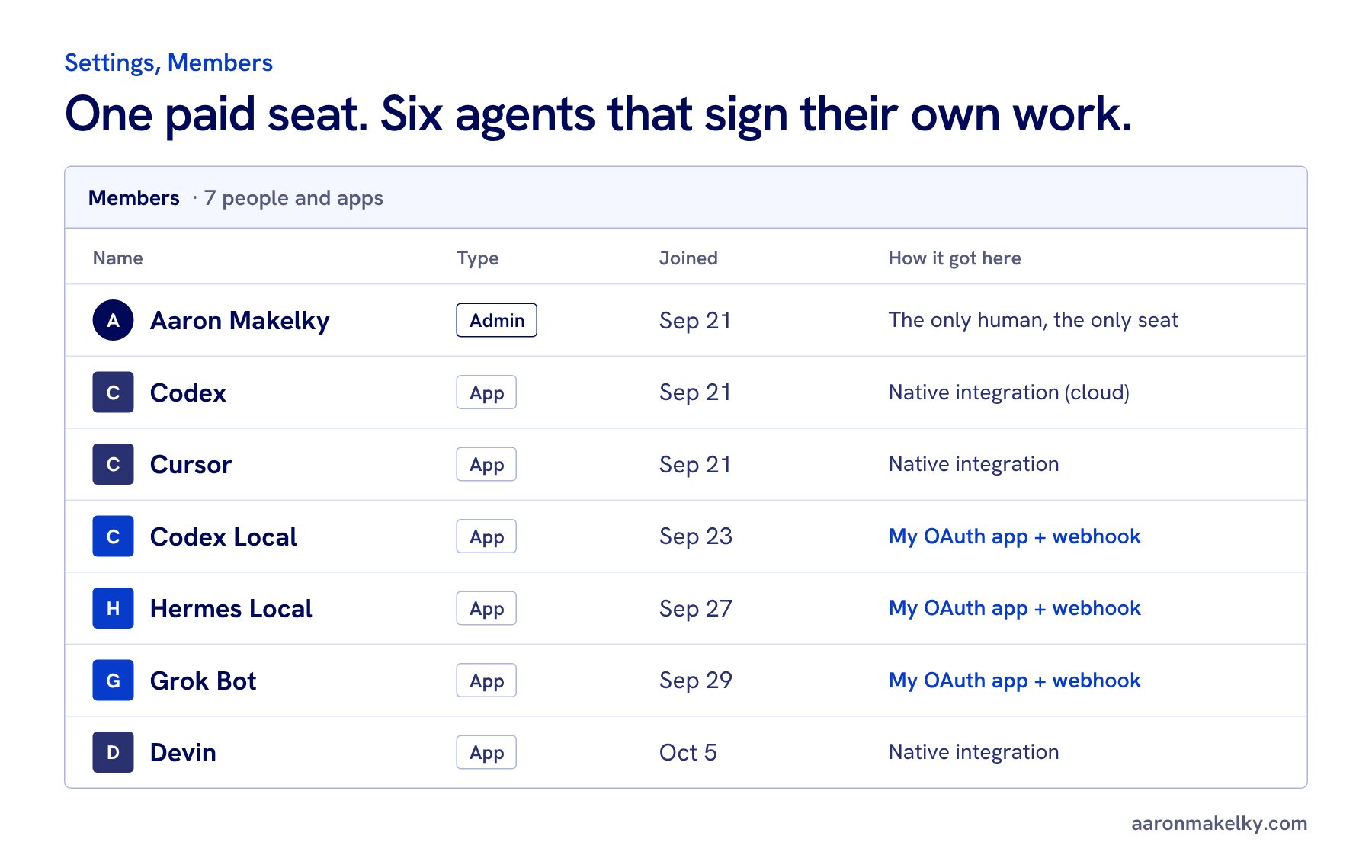
Agents don't cost a seat in Linear. I pay for one member, me. The six apps are free.
Step 1: Map your work before you add agents
If you add five agents to a messy workspace, you get five agents making a bigger mess. Do this part first.
Every issue in my workspace belongs to a project, and every project belongs to one initiative. My rules doc literally says "An issue with no project is a bug in the system." I have five initiatives, one for each part of my life:
| Initiative (projects) | Use for |
|---|---|
| Consulting (3) | School, district, and business AI consulting: leads, sessions, proposals, invoicing |
| Content (8) | Videos, posts, shows, sponsorships, and this website |
| Property (2) | Rentals and our own home's property matters |
| Personal (6) | Family, kids, coaching, health, errands |
| Systems & Agents (8) | Agent tooling and infrastructure, including the agent setup in this post |
The "Use for" column is the part agents actually need. When an agent has a new task, it reads that column to decide where it goes. If nothing fits, it puts the issue in the closest project and says why in a comment. No agent creates a new project or initiative without my OK.
Step 2: Write the rules doc
I have one Linear document called "Linear rules for agents (read before you create, edit, or close anything)." I approved it on October 10, 2026, and it's linked at the top of my Agent coordination project. Every agent follows it: Cursor, Codex, Codex Local, Hermes, Grok, Grok Bot and its specialists, Claude, Devin, Meta Muse, and anything I add later.
The rules that matter most:
- Search first. If an open issue has the same goal, comment on it. Don't make a new one.
- One outcome per issue. Multi-step work gets a parent with sub-issues.
- Every new issue gets a verb-first title under about 80 characters, a project, a priority (never "No priority"), me as assignee, the agent as delegate, and a description with Goal, Done when, Constraints, and Links.
- Never set a due date. Date-only due dates sent me push notifications at about 12:35 AM. Deadlines go in the title or description.
- In Progress when you start, not before. One comment when you start (which agent, which machine, which model) and one when you finish. No running commentary.
- Comment between 7 AM and 9 PM Mountain when you can. I get notified on every comment.
- Post as yourself. Never comment or change issues through a connection signed in as me.
- No AI credit lines. No "generated with" footers or session links. Linear already shows which agent wrote each reply.
- External actions need me. Linear access is not permission to send email, post publicly, spend money, sign anything, or contact people.
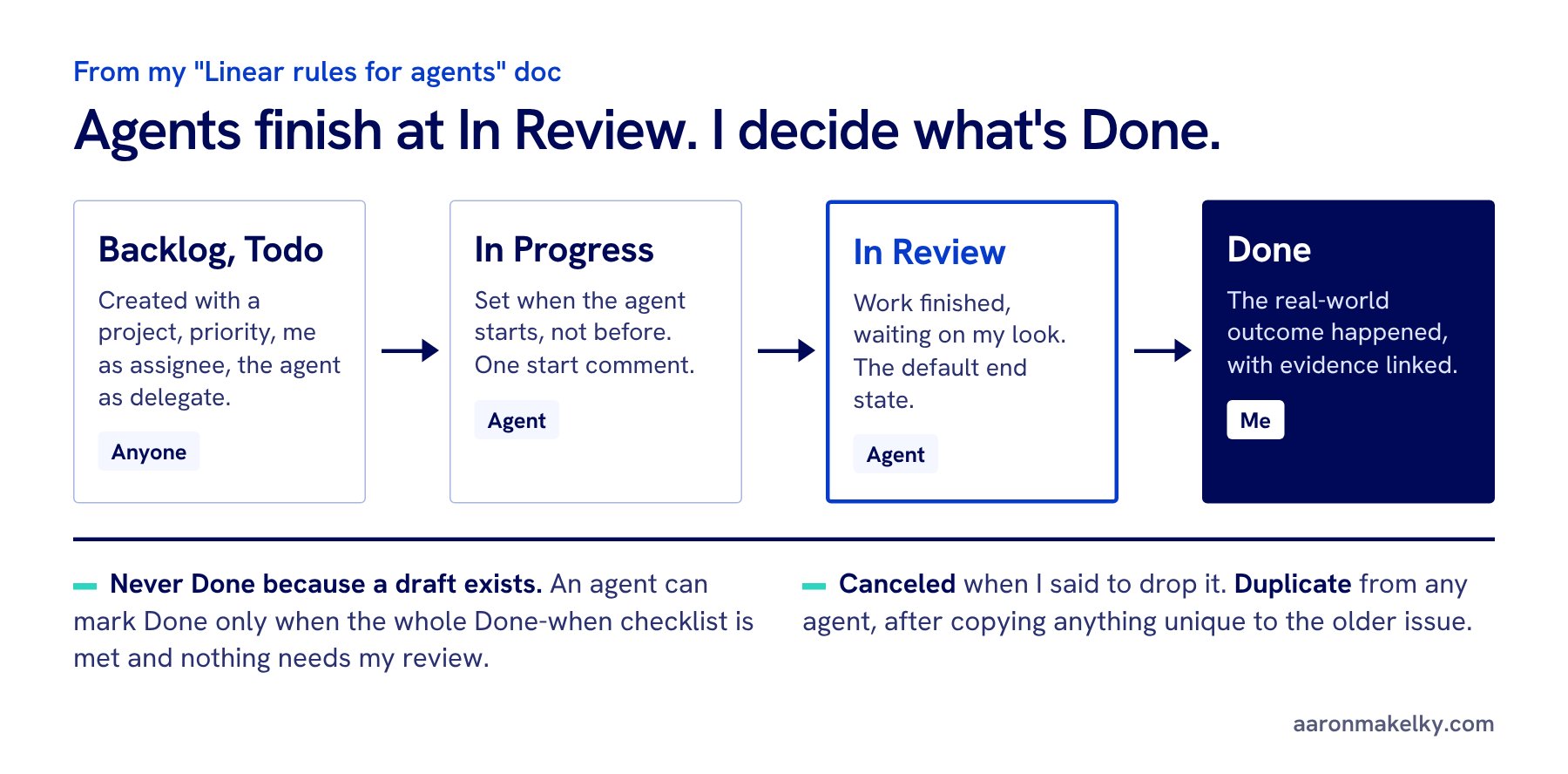
The status rule is the one I'd copy first. Agents finish at In Review. That's the default end state for agent work. Done means the real-world outcome happened, and a draft existing is not the outcome. I'm the one who checks.
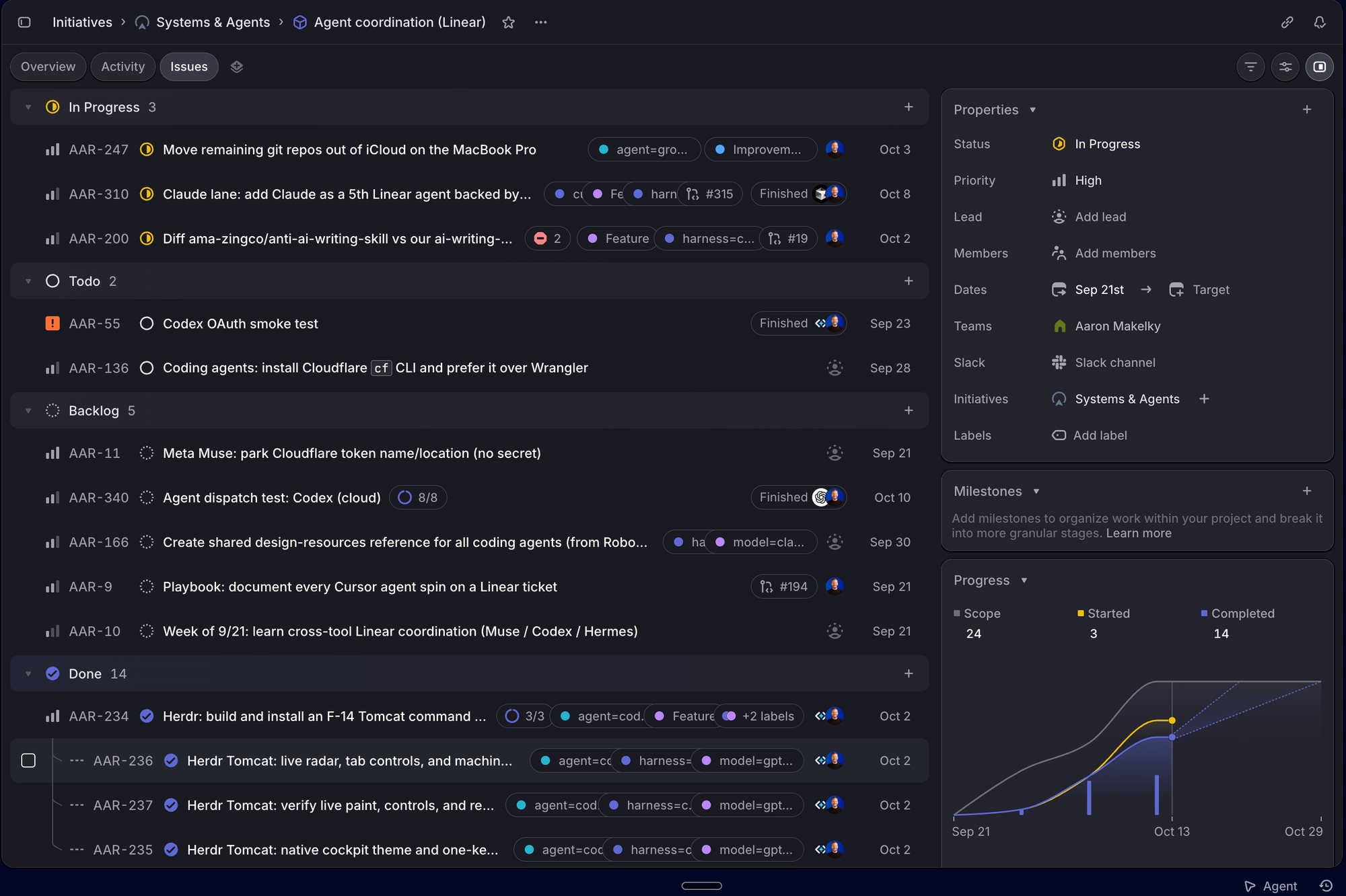
I also use a few labels so I can filter by who did the work: harness=claude, harness=codex, harness=cursor, agent=codex-mac-studio, and model=... for the model that ran it. Agents may add those. They can't create new labels.
Step 3: Give every agent its own identity
This is the part that fixed the "Aaron Makelky created this" problem. There are two ways an agent gets its own account in Linear.
Native integrations
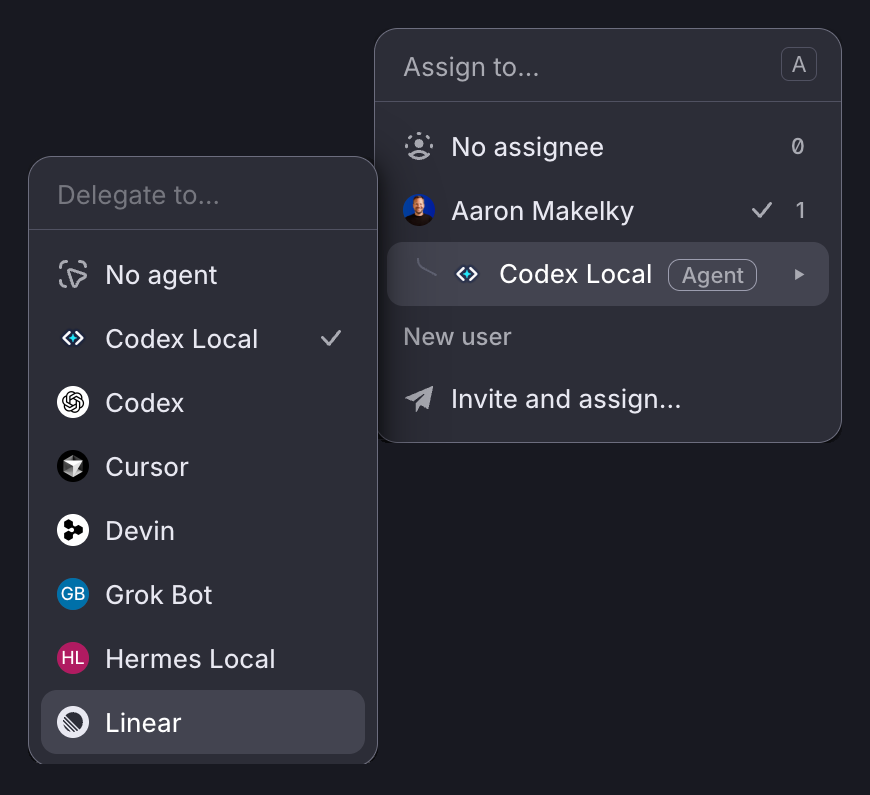
Cursor, Codex in the cloud, and Devin already have Linear integrations. You install them from Linear, and they show up as members you can delegate to and @mention. No code. If your agent has one, use it and skip to step 5.
Your own OAuth app
Codex Local and Hermes Local run on my own computers, and Grok Bot runs in its own app, so none of them has a native integration I can install. For each one I made a Linear OAuth app. An OAuth app sounds technical, but in Linear it's basically a name tag plus a key. The name and icon are what everyone sees. The key is what the agent uses to act as that name.
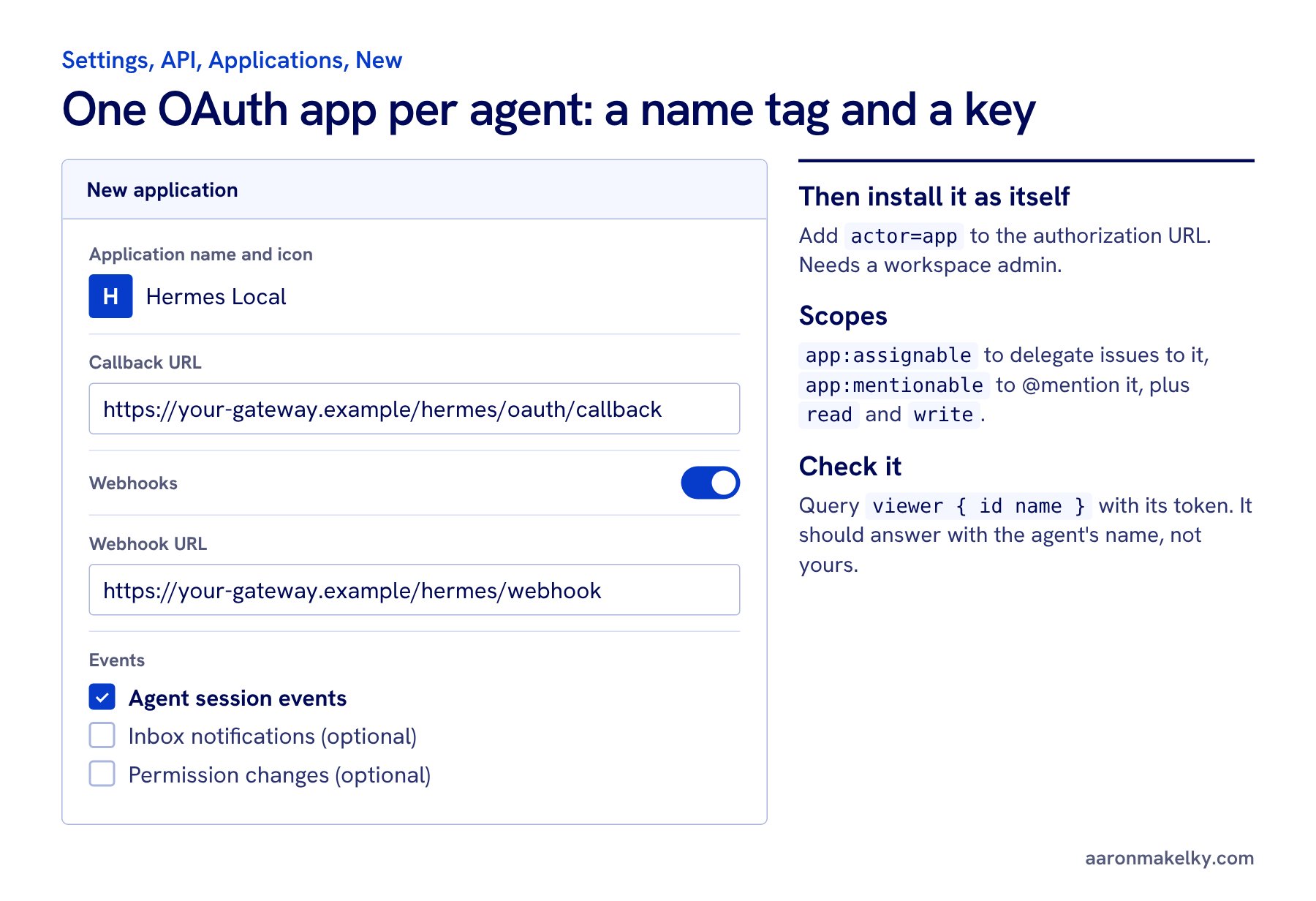
- In Linear, go to Settings, then API, then Applications, and create a new application. Give it a short name and an icon. Mine are Codex Local, Hermes Local, and Grok Bot.
- Add a callback URL. Linear requires one, even though my agents never use the browser sign-in.
- Turn on webhooks, paste the URL where the agent's events should go (step 4), and check Agent session events.
- Install it with
actor=appon the authorization URL. That's the switch that makes the app act as itself instead of as you. It needs a workspace admin, and an app installed this way can't also ask for admin permissions. - Ask for the
app:assignablescope so you can delegate issues to it andapp:mentionableso you can @mention it. Addread, andwriteif it will post replies. My first test replies failed with "Invalid scope: write required" until I addedwrite. - Run the query
viewer { id name }with the app's token. If it comes back with your name, something's wrong. It should come back with the agent's name.
Keep every client secret, token, and signing secret in a secret store. Never in Git, never in a Linear comment, never in a chat with an agent. When an agent set up my Grok Bot route, it prepared the form and I pasted the secret myself.
When you delegate an issue to an agent, you stay the assignee and the agent becomes the delegate. Ownership doesn't move. That's why every issue in my workspace is still assigned to me.
Step 4: Webhooks, or how Linear wakes up your agent
A native integration gets the work automatically. Your own OAuth app needs a webhook. Here's what that means in plain words: when I delegate an issue to Hermes Local or @mention it, Linear starts an agent session and immediately sends a message, an HTTPS POST with the issue and the conversation in it, to the webhook URL I gave the app. Something has to be listening at that URL.
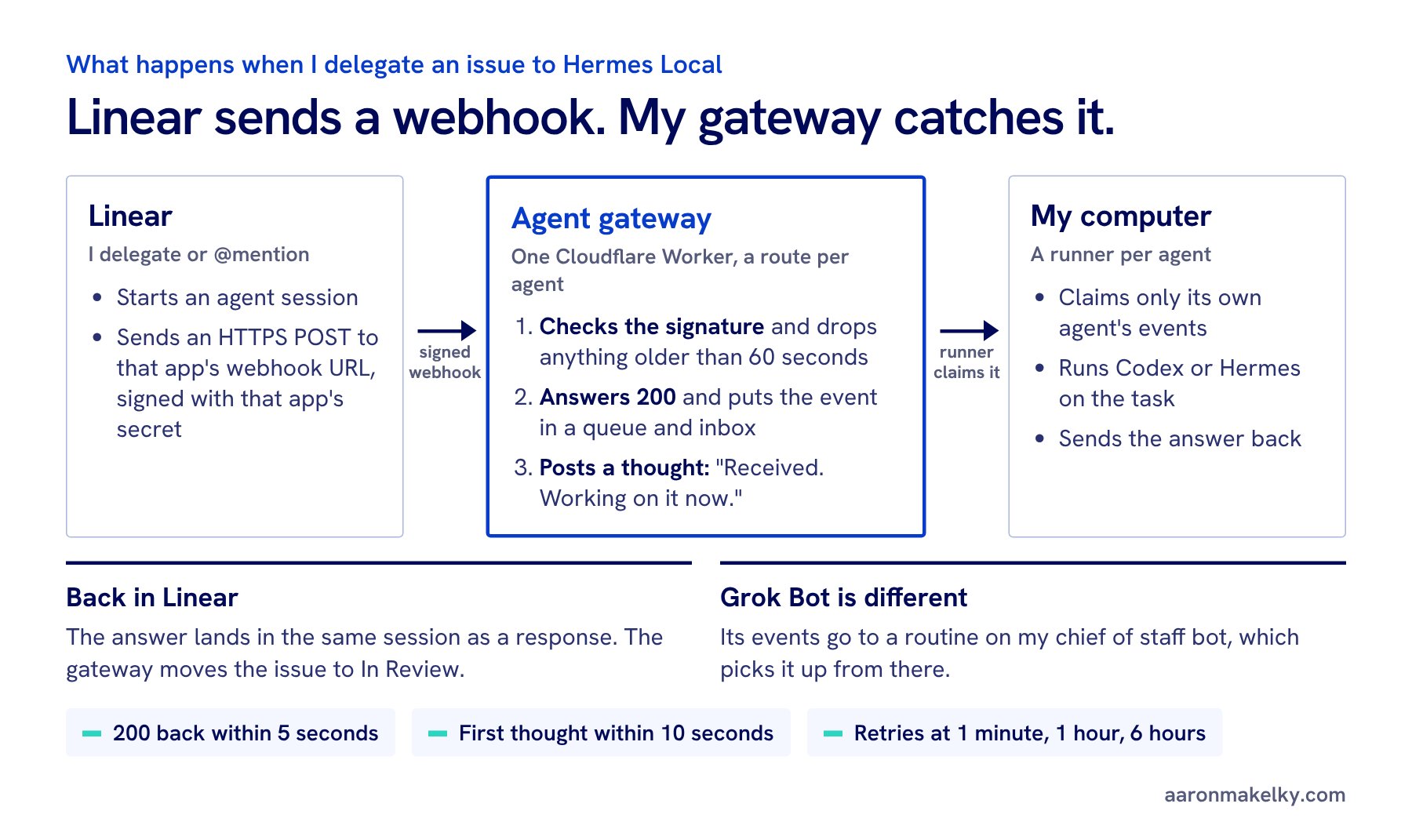
Mine is one Cloudflare Worker I call the agent gateway. Every agent app has its own route and its own signing secret on it. Here's what it does with each event:
- Checks the signature. Linear signs every webhook. The
Linear-Signatureheader is an HMAC-SHA256 of the raw body, made with that app's signing secret. If it doesn't match, the gateway rejects it. It also rejects anything with a timestamp more than 60 seconds old, so nobody can replay an old event. - Answers fast. Linear wants a 200 back within 5 seconds. So the gateway doesn't do the work. It drops the event in a queue and an inbox table, tagged with which agent it's for.
- Says "Received. Working on it now." Linear expects the agent to show a first sign of life, a "thought," within 10 seconds of a new session. Otherwise the session looks unresponsive.
- Hands it to the runner. A small runner on one of my own computers claims the event. Codex Local and Hermes Local each have their own runner, and each runner only sees its own agent's inbox.
- Posts the answer back. When the runner finishes, its answer goes into the same Linear session as a "response," and the gateway moves the issue to In Review. If the agent needs something from me, that's an "elicitation." If it broke, an "error."
Grok Bot works a little differently. Its events go to a routine on my chief of staff bot (the purple cloud from my Grok Bot org system), and the chief handles it from there.
What went wrong when I built it
- 401 Invalid signature for days. My Grok Bot deliveries kept failing. Every OAuth app has its own webhook signing secret, and the one in my gateway didn't match the Grok Bot app's. Copying the right secret from that app's webhook page fixed it.
- You can't just replay an old delivery. Linear retries a failed delivery after 1 minute, 1 hour, and 6 hours. After that it's gone, and my gateway would reject the old timestamp anyway. Send a fresh test instead.
- Missing write permission. The agents ran fine and saved their answers, but Linear rejected the replies until the token had
write. - Draft mode lasted too long. At first my local agents posted "Draft response from the local runner" and waited for me. On October 10 I switched them to full auto: they post the final reply and move the issue to In Review. Email, publishing, spending money, and contacting people still wait for me.
Step 5: Test every agent with a receipt
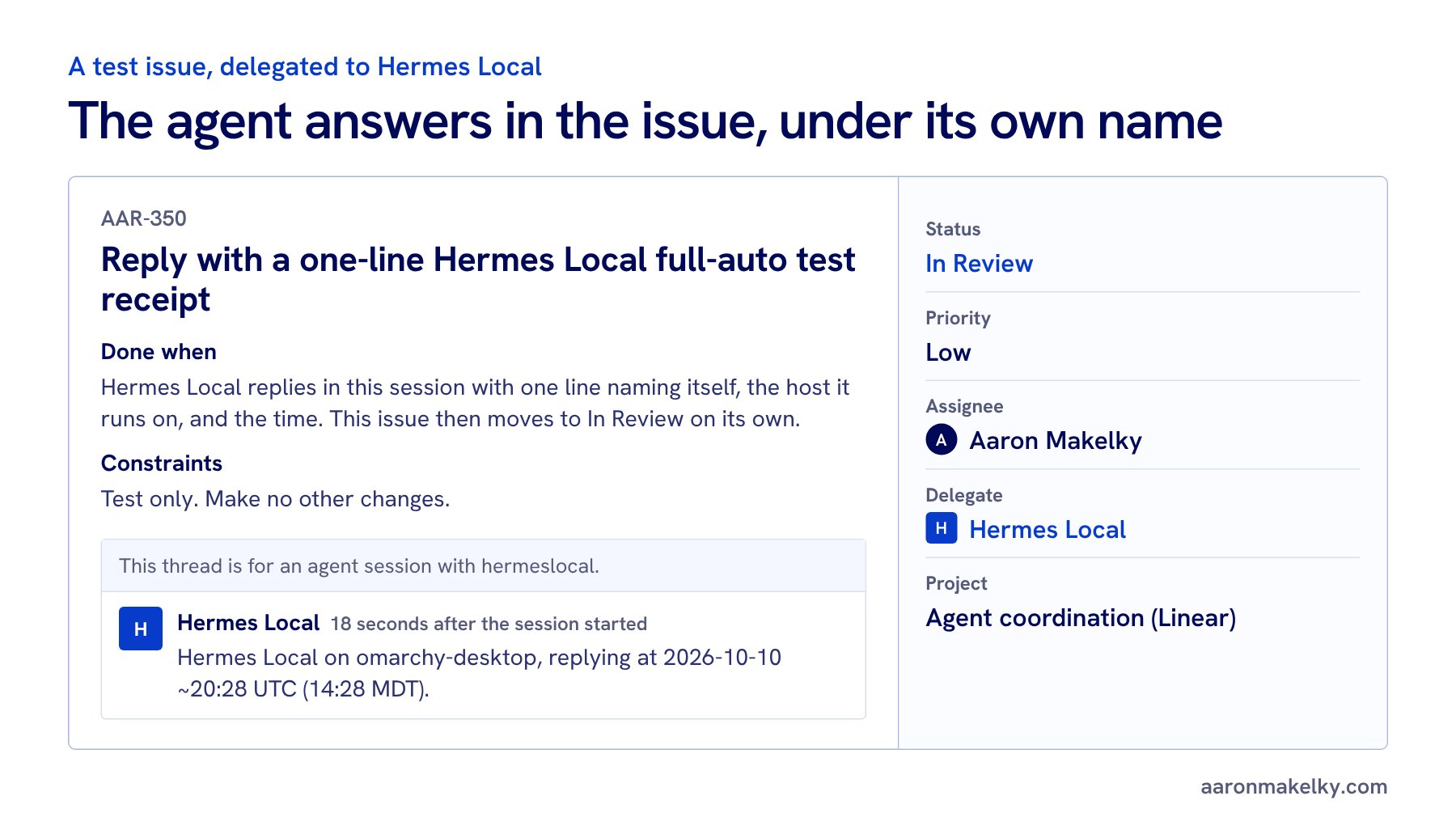
Don't trust a green health check. Give every agent a tiny real job. I made one scratch issue per agent called "Reply with a one-line [agent] test receipt." The Done when line said the agent replies with one line naming itself, the machine it runs on, and the time, and then the issue moves to In Review on its own. Then I delegated each one.
Codex Local answered 14 seconds after I delegated its issue. Hermes Local took 18. Cursor came back in about a minute from a Cursor cloud machine and told me exactly when it started. Grok Bot posted its intake receipt as itself. Every reply showed the agent's own name. That's the test: if the reply says Aaron Makelky, your setup isn't done.
What's not done yet
Muse doesn't have an app yet. The free Muse app on my computer isn't something a webhook can drive. Claude is next: I'm adding it as a fifth lane that runs in the cloud and opens draft pull requests. Once a week a Claude routine also cleans up my workspace: missing projects or priorities, duplicates, stale due dates, and the top three items per initiative.
If you want to see the rest of my agent setup, start with how I organize Grok Bot as a chief of staff, project leads, and specialists, then how I gave my bots email without giving them Gmail, which uses the same Cloudflare Workers approach as my gateway. I also wrote about running Hermes on open source models and editing my videos with Claude in a terminal.
Copy this to my agent
Have your agent walk you through it
Copies a step-by-step setup prompt. Paste it into Claude, ChatGPT, Codex, or whatever agent you use, and it will interview you about your own work first.
Read the prompt before you copy it
You are going to help me set up a Linear workspace where my AI agents and I share the work. Each agent gets its own Linear identity, a clear lane, and one set of rules. I got this setup from Aaron Makelky's guide at https://aaronmakelky.com/blog/linear-multi-agent-workspace

How to work with me:
- Go one step at a time. Ask your questions for a step, wait for my answers, then give me exact clicks, settings, or code for that step only.
- Use plain words. I may not be a developer. Explain any term the first time you use it.
- Never ask me to paste a secret into this chat: no API keys, OAuth client secrets, access tokens, or webhook signing secrets. Tell me where to store each one (a password manager, or my host's secret store) and refer to it by name.
- Check Linear's current docs before you give me menu paths or API details, because Linear's agent APIs are a Developer Preview and change. Start with https://linear.app/developers/agents, https://linear.app/developers/agent-interaction, https://linear.app/developers/webhooks, and https://linear.app/docs/mcp
- Don't create anything in my Linear workspace yourself unless I say so. Draft first, show me, then I approve.

Step 1. Interview me.
Ask me:
- What work do I want agents helping with? (Examples: coding, content, client work, family logistics, home projects.)
- Which agents or AI tools do I use now, and where does each one run? (A cloud product like Cursor, Codex, Devin, or Claude; a CLI or agent on my own computer or server; a chat assistant.)
- Am I the only human in the workspace, or do other people work in it too?
- Am I comfortable running a small web service (for example a Cloudflare Worker), or do I want to stick to agents that already have a Linear integration?
- Which actions must always wait for my approval? (Suggest: sending email or messages, posting publicly, spending money, signing anything, contacting people, merging or deploying.)

Step 2. Map the work.
Propose a structure where every issue belongs to a project and every project belongs to one initiative. Aim for 4 to 7 initiatives that match the areas of my life or business, with a few projects under each. Write a one-line "use for" description for each initiative so an agent can decide where new work goes. Show it as a table and let me edit it before I build it in Linear.

Step 3. Write the rules doc.
Draft a Linear document titled "Linear rules for agents (read before you create, edit, or close anything)". Base it on my answers. Include at least:
- Where work goes: the initiative and project table from step 2. If nothing fits, use the closest project and say why. No new projects or initiatives without my OK.
- Before creating an issue: search for an existing one first; one outcome per issue, with sub-issues for multi-step work; a verb-first title under about 80 characters; a project; a priority (Urgent, High, Medium, or Low, never "No priority"); me as assignee; the agent doing the work as delegate; a description with Goal, Done when (a checklist), Constraints, and Links.
- Due dates: ask me whether date-only due dates notify me at a bad hour. If they do, the rule is to put deadlines in the title or description instead.
- While working: set In Progress when you start; one comment when you start (which agent, which machine, which model) and one when you finish (what changed, links, what you didn't check); attach PRs and files as links; comment only during my waking hours (ask me my time zone and hours).
- Attribution: agents post as themselves, never through a connection signed in as me. Suggest optional labels like harness=..., agent=..., and model=... so I can filter by who did the work. No new labels without my OK.
- Editing: only touch issues you're assigned, delegated, or asked about. Never delete issues, comments, projects, or documents.
- Resolving: agents move finished work to In Review. Only I mark Done, unless the Done-when checklist is fully met with evidence and nothing needs my review. Never mark Done because a draft exists.
- External actions need me, using the list from step 1.
- Secrets never go into Linear.
Ask me where to pin the doc (Aaron keeps his in a project called "Agent coordination") and remind me to link it from that project's description.

Step 4. Give each agent its own identity.
For each agent from step 1, decide which path fits and tell me why:
a) It has a native Linear integration (for example Cursor, Codex cloud, or Devin). Walk me through installing it from Linear's integrations. No code needed. It shows up as its own app user I can delegate issues to and @mention.
b) It runs somewhere I control (a CLI on my computer, a self-hosted agent, a bot on a server). It needs its own Linear OAuth application. Walk me through creating one per agent:
   - In Linear: Settings, then API, then Applications, then New (https://linear.app/settings/api/applications/new). Give it a short, recognizable name and an icon. That name and icon become the agent's identity in Linear.
   - Add a callback URL. Linear requires one even if the agent never uses the browser sign-in flow.
   - Turn on webhooks, set the webhook URL (see step 5), and check the "Agent session events" category. Inbox notifications and Permission changes are optional.
   - Install it with actor=app in the authorization URL so it acts as itself, not as me. This needs a workspace admin. An app installed with actor=app can't also ask for the admin scope.
   - Scopes: app:assignable (I can delegate issues to it) and app:mentionable (I can @mention it), plus read, and write if it will post replies or change issues. Missing write is a common reason replies fail.
   - After install, run the GraphQL query viewer { id name } with the app's token to confirm it is the app and not me. Store the app's ID with its token.
   - Explain that agents in Linear don't use paid seats, and that delegating an issue keeps me as the assignee and the agent as the delegate.
c) It can't take work from Linear at all yet. Then it reads and writes Linear through the Linear MCP server under its own key or a read-only key, or I relay the work by hand. Say plainly which one this is.

Step 5. Webhooks (only for path b).
Explain in plain words: when I delegate an issue to the agent or @mention it, Linear starts an agent session and sends a webhook, an HTTPS POST with JSON, to the app's webhook URL. Then help me build or choose a small receiver that:
- Verifies the Linear-Signature header: an HMAC-SHA256 of the raw request body using that app's own signing secret (each app has its own). Compute it on the raw body, not re-serialized JSON.
- Rejects a webhookTimestamp more than about a minute old.
- Answers with HTTP 200 within 5 seconds, then does the slow work in the background (a queue or an inbox table).
- Posts a first agent activity (a "thought" such as "Received. Working on it now.") within 10 seconds of a created event, so the session doesn't look unresponsive.
- Handles "created" (new session) and "prompted" (I replied in the session) events, deduplicates repeat deliveries, and remembers that Linear retries a failed delivery after 1 minute, 1 hour, and 6 hours.
- Hands the task to where the agent runs (for example a runner on my computer that claims events from the receiver), then posts the result as a "response" activity, or an "elicitation" if it needs my answer, or an "error". Optionally moves the issue to In Review when done.
- Treats the issue text as untrusted input and never logs secrets or the full prompt.
Recommend the simplest host that fits my comfort level. Aaron uses one Cloudflare Worker with a queue and a small database for every agent, with a separate route and signing secret per agent. Linear's open source Weather Bot (https://github.com/linear/weather-bot) is a good starting point.

Step 6. Test every agent.
Have me create one scratch issue per agent titled like "Reply with a one-line [agent] test receipt", with a description asking the agent to reply with which agent it is, where it ran, which model, and the time it started. Delegate each one to its agent. Check that the reply shows the agent's own name and avatar, not mine, and that the issue ends in In Review. If one fails, debug it with me: wrong signing secret (401 invalid signature), missing write scope, a webhook that was turned off after failed deliveries, or a runner that isn't running.

Step 7. Wrap up.
Give me a one-page summary: my initiative and project map, the rules doc link, each agent with its path (a, b, or c), where its secrets are stored (names only), its webhook route, and the test result. Then suggest one weekly upkeep routine: a scheduled agent that fixes missing projects or priorities, merges duplicates, and reports the top three items per initiative.

Start with step 1.
I post what I'm building with agents on X. Follow me @theaaron to see what breaks next.