Field notes
I made a nature documentary about my gym fridge
· 9 min read
Claude Code · HeyGen · AI Video Editing · FFmpeg · Creator Workflows
I filled the mini fridge in my home gym with Liquid Death and had it narrated like a nature documentary, down to a pink bottle introduced as the alpha of the herd.
I shot it in 33 minutes. The edit took the rest of the evening, and most of that was me finding out what I should have said in the first prompt.
The same captioned version is on X if you want the replies too.
Disclosure: this is part of my Liquid Death "world's busiest parent" partnership. They sent me free Liquid Death for a year.
The gear and the footage
- Camera: Insta360 Luna Ultra on a low tripod. (Some links here are Amazon affiliate links: I receive a small percentage of purchases and they cost you nothing extra. Any revenue goes to my children's coding and hardware projects. As an Amazon Associate I earn from qualifying purchases.)
- Footage: 23 clips, 11.3 minutes, 7.1 GB of HEVC. Most at 4K 30 fps, two at 4K 24, the walk-in at 1080p 240 fps, and the pink bottle at 4K 120 fps.
- Audio: the camera mic, for room sound only. I filmed it silent. The narration is generated.
- Voice: HeyGen text to speech with a voice I designed in HeyGen, through the HeyGen CLI (v0.10.0).
- Editing: Claude Code on Opus 5.5 in the Claude desktop app on my MacBook Pro. It drove FFmpeg 8.1.2 and Python. I followed along from my iPhone with Claude Remote Control.
- Tracking: the shot list in Notion, the job in a Linear ticket.
- Music: two tracks I already had, "Jungle Adventure" and "The Spirit Of Nature."
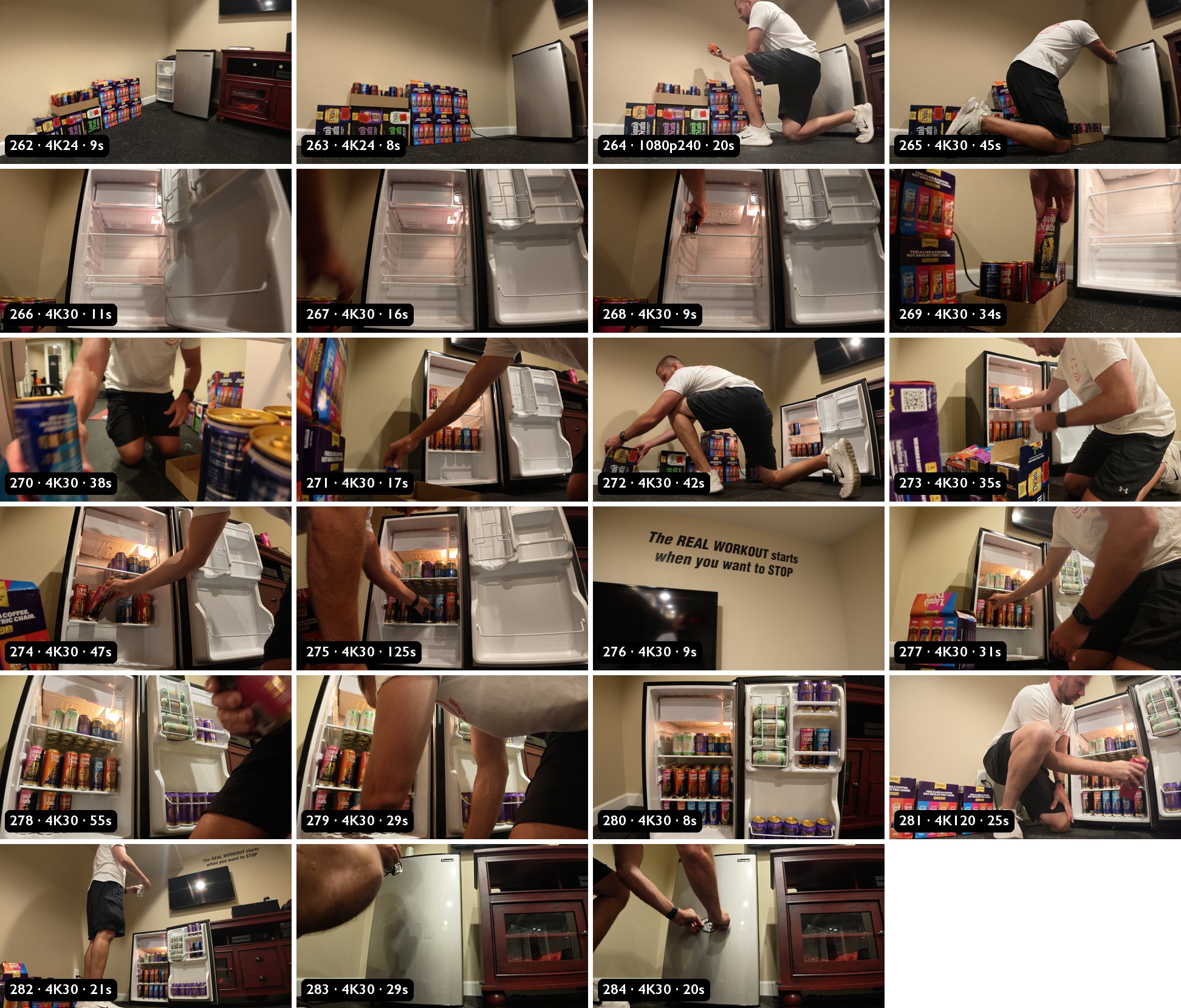
The shot list in Notion had 14 beats, from "Establishing" to "Marking Territory," with notes like "Shoot this before the shelves fill" and "Slow-mo take." It also said to shoot flat/log for grading. The clips came off the camera in standard Rec.709, so there was nothing to grade.
The prompt
The plan lived in Linear ticket AAR-330: ingest, rough cut, narration script, voiceover, final mix. It also had these two lines:
"No David Attenborough voice clone or name-implied impersonation. No licensed Attenborough voice exists, and he has publicly objected to clones."
"Preparation is not authorization. Don't post, publish, or share anything without Aaron's explicit go-ahead."
With the camera plugged into my MacBook, I typed:
work on AAR-330. camera is plugged in to this macbook, and api key for heygen voice is local as wellIt found the 23 clips on the SD card, copied them off, checked every file size against the original, and left the card alone. Then it pulled frames from each clip and matched them to the shot list. Three beats came up short. "The Den Is Full" had no take at all, and First Can and Stakes were shot at 30 fps, not slow-mo.
The API key I said was "local" was an empty file. The first save had failed. Claude caught it before spending anything and asked me to fix it.
The script came before the voice
Then two messages before it touched the voice:
heygen api key has $15 on it now. only use it when it's prudent and efficient to start generating the voice over. i installed the heygen cli locally on this macbook tooi need to approve the voiceover script before you start generatingSo it wrote 14 lines timed to the rough cut and ran them through my AI writing audit before I saw them. A few of them:
"The adult male approaches. He has waited his whole life for this moment."
"Magnificent."
"But not this one. The alpha is pink, and far too large for the den."
"Finally, he marks his territory, so that all who pass will know this den is spoken for."
I replied "script approved. ship it!" It generated line 1 alone, checked the wallet, then did the other 13. Each line was one call:
heygen voice speech create --voice-id <my designed voice> \
  --text "The adult male approaches. He has waited his whole life for this moment." \
  --language en
All 14 lines cost $0.23. The wallet went from $15.00 to $14.77.
The response also includes a timestamp for every word, and that's where the captions came from later. No transcription pass.
Music
I dropped two tracks in an iCloud folder:
use each of these as a background track, we'll see which comes out better.It mixed both. The first version had a gag: the music swells over the slow-mo first can, then cuts to silence on the lone can in the fridge, then the narrator says "Magnificent." On my phone that silence just sounded broken.
And then the background music cuts out too much. It should never cut out all the way like when it shows the one can in the fridge by itself. It shouldn't go completely quiet.Now it dips a few dB under the lone can, holds under the line, and comes back over two seconds. Every level change is a ramp.
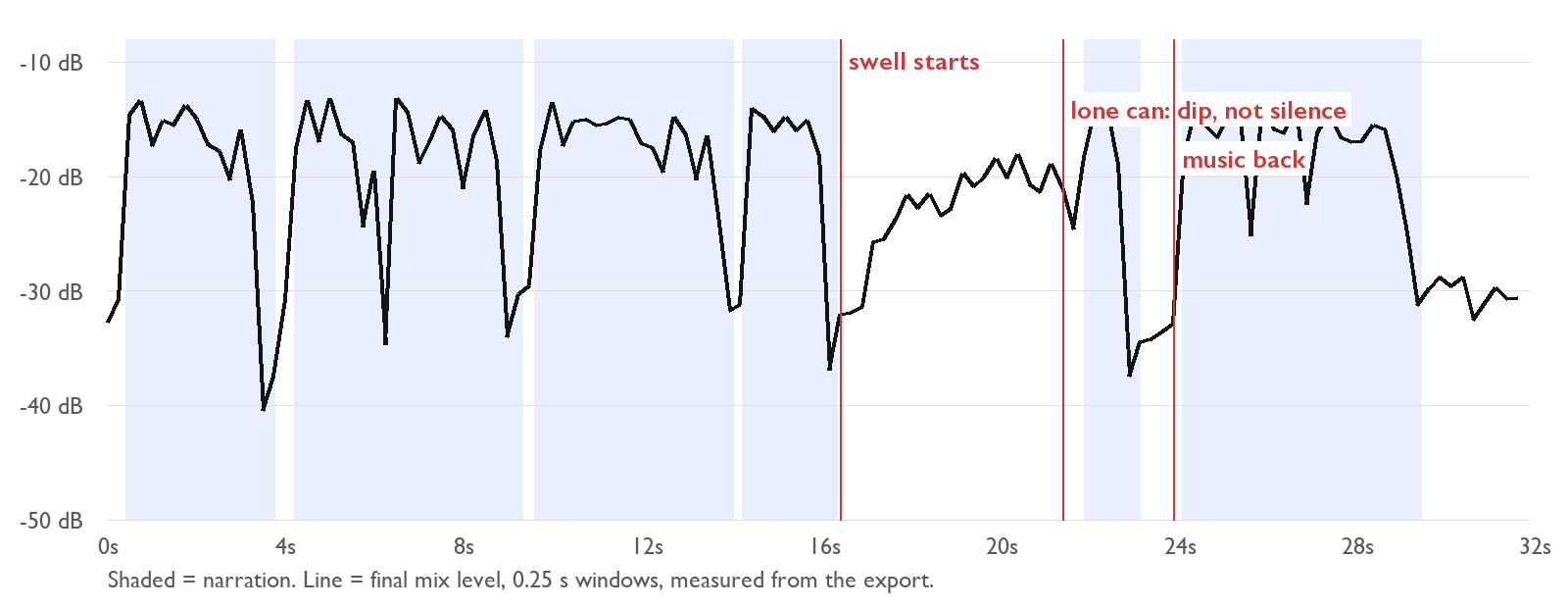
FFmpeg's two-pass loudness filter quietly switched to dynamic mode and squashed the swell right back down. The fix was one static gain to -14 LUFS and a peak limiter after it. The final sits at -14 LUFS with true peak around -2.3 dBTP.
The crop problem
I shot everything 16:9 and wanted vertical. The first cut cropped every shot to a 9:16 slice, and the wall decal came out like this:
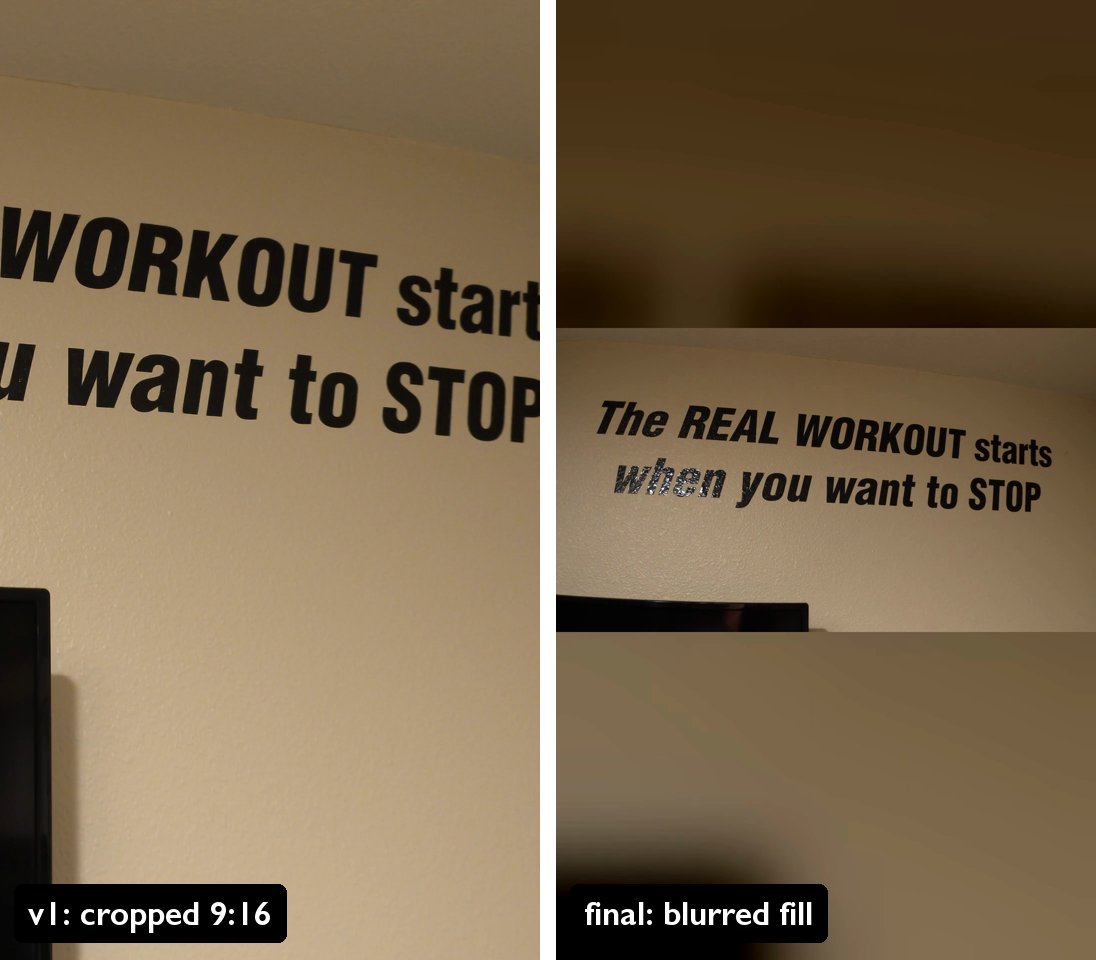
It fixed that shot and the pink bottle. Then I watched it on my phone and found more:
Now we need a 16 x 9 version because some of the shots are still not cropped correctly when he cradles the alpha can it's somewhat out of frame and we never actually get a good shot of the full fridge so I'm not sure that's gonna be possible on the 9 x 16 if you have to what we can do to get a 9 x 16 is just take the 16 x 9 and put it against the semi transparent background version of itself like you did with the wide angle shot of the quote on the wall.So it cut a 16:9 master and made two verticals from it: the full frame over a blurred copy of itself, and a native vertical crop.
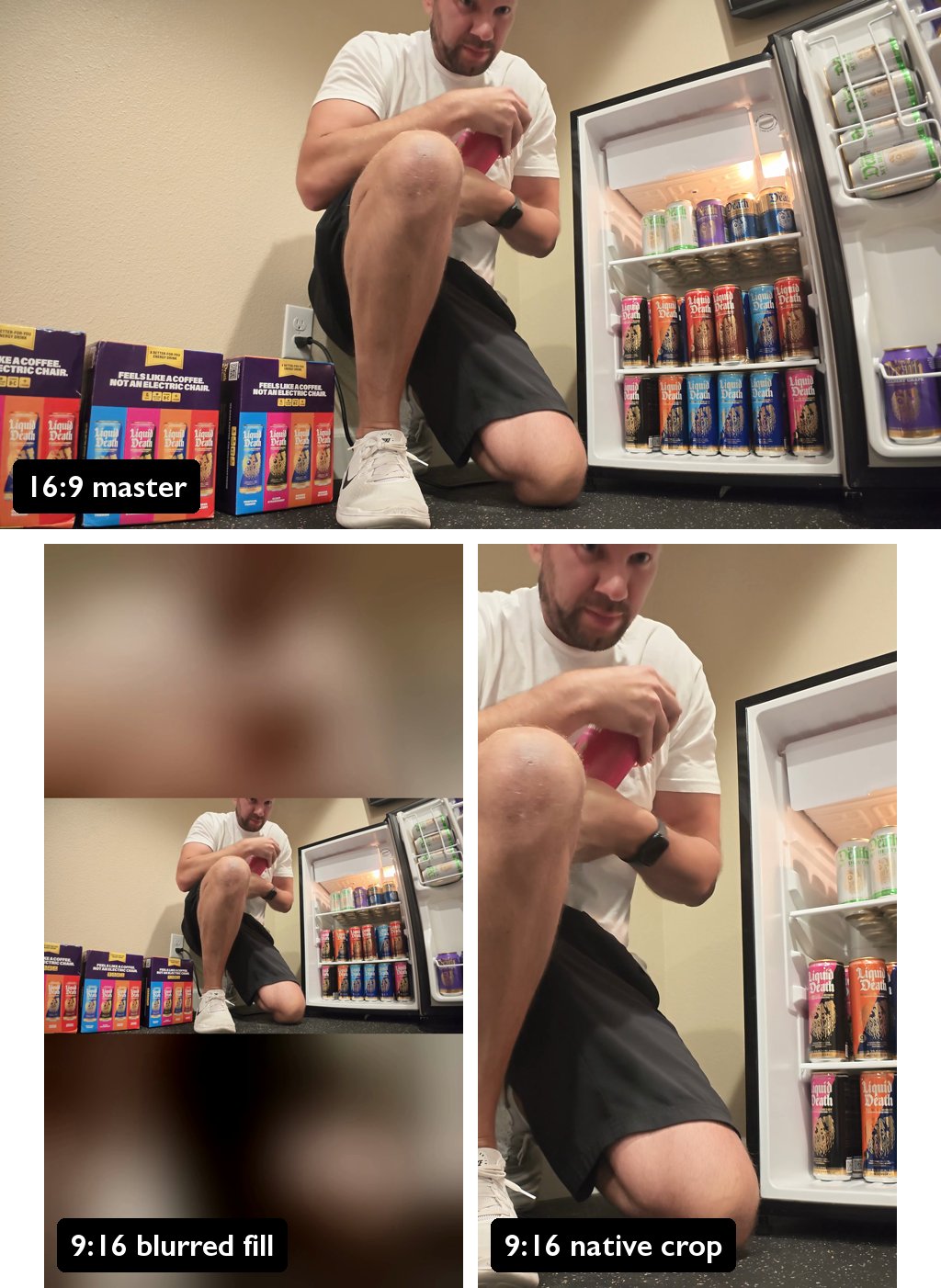
The blurred fill is one FFmpeg filter:
[0:v]split[a][b];
[a]scale=-2:480,crop=270:480,boxblur=20:2,scale=1080:1920,eq=brightness=-0.12[bg];
[b]scale=1080:-2[fg];
[bg][fg]overlay=(W-w)/2:(H-h)/2
Captions in the blurred band
Let's take the 9 x 16 jungle version, and on the blurred upper portion put captions for the narrators voice in a clean readable outline style with the active word in just like black-and-white, but make the style of captions you would expect on a planet Earth classy documentary.It picked Gill Sans, the typeface in the BBC logo, which was already on my Mac. White with a thin black outline, and the word being spoken flips to black on a white box.
My FFmpeg build can't draw text, so it drew each caption state as a transparent image in Python and laid all 148 of them over the video in one pass. The timing came straight from HeyGen's word timestamps.
Then:
Make sure they're centered and fit within social media safe zones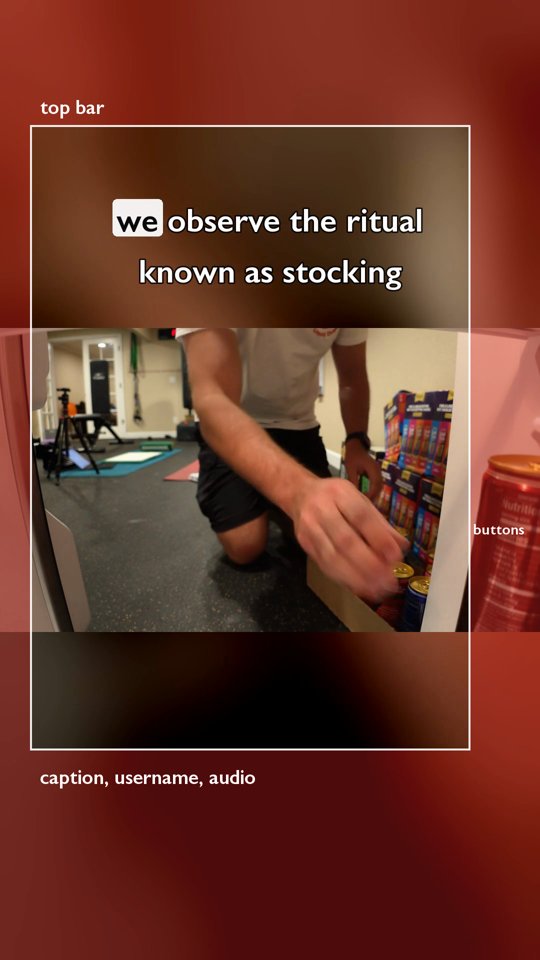
It measured the edges of every caption state against the usual top, bottom, and right-side margins and passed. Later, when it finally read my video skill, it found stricter numbers: everything inside x 60 to 940 and y 250 to 1500 on a 1080 by 1920 frame. The captions ran to x 947. It pulled the width in, and they sit at x 158 to 923 now, centered to the pixel.
No black first frame, and a loop
The next note was dictated, so "in heat" means "in feed":
make sure the first frame is not black because in heat it's gonna load black and that's gonna kill our view retention rate so make it something more engaging that still fits the flow of the videoEven better if we can loop the first and last frame so they connect when it replays on social platformsThe fade-in from black came out. Frame 1 is now the wide shot of the case stack and the empty fridge, with the first caption already on screen.
For the loop, it split that opening shot. The video starts 1.5 seconds into it, and the first 1.5 seconds play at the very end, right after the sticker. When the app replays, the last frame runs into frame 1. The music starts 1.5 seconds into the track and crossfades back into the track's first 1.5 seconds at the end, so it doesn't restart either.
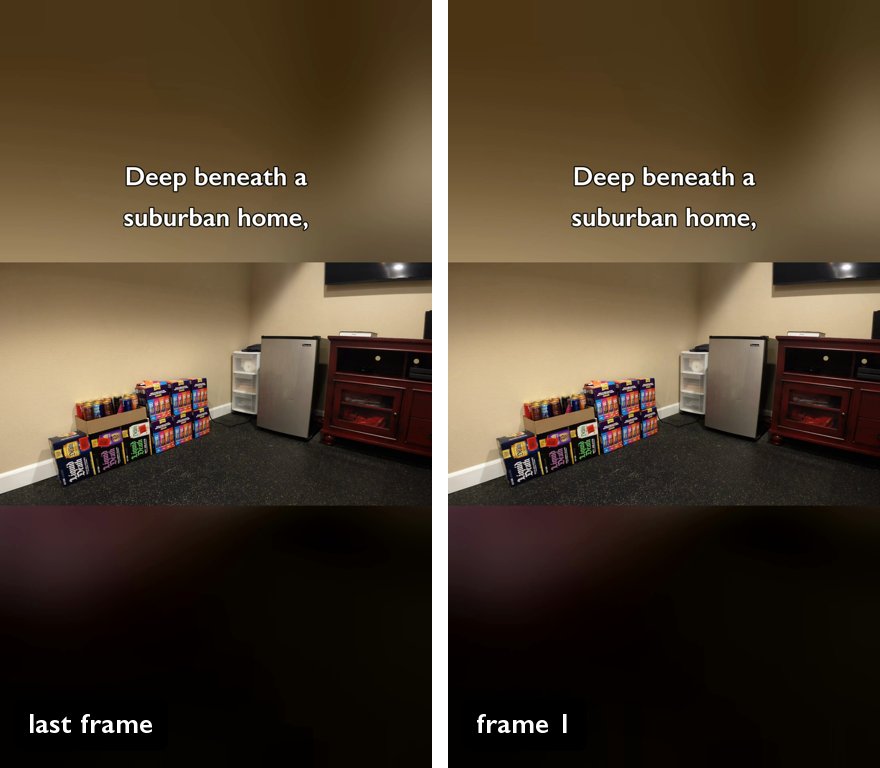
He marks his territory, and then we're back at an empty habitat.
The sticker push-in
Final note for an edit on the last cut where the sticker is on the fridge we need to progressive zoom in on the Liquid Death sticker in the middle of the stainless steel fridge cause some people are not gonna recognize the logo and it's too zoomed out but still match the last frame of the video to the first frame so it loops seamlesslyAt full frame the sticker covered about 6% of the width. It's a slow eased zoom now, 3.5x on the 16:9 master, from right after the slap to the end of the shot.

Halfway through the zoom, my hand came back into frame holding a can and covered the sticker for about two seconds. The camera was locked off, so it cut those two seconds and ran one zoom curve across both sides of the cut.
What I'd do differently
The first full version, with voice and both music tracks, came back about 70 minutes after my first prompt. The last change landed around 8 PM. Most of that gap came from things I could have said up front or shot differently:
- Say the formats in the first prompt: 16:9 plus both verticals. That one sentence would have saved two rounds of crop fixes.
- Say "no black first frame" and "make it loop" up front. Both are easy on the first pass.
- Shoot the vertical-critical moments in the middle third of the frame, and step back for the full-fridge shot.
- Shoot every slow-mo beat at 120 or 240 fps. First Can had to be slowed from 30 fps with frame interpolation, and Stakes got sped up instead of slowed.
- Get every beat on the list. "The Den Is Full" never got shot.
- Raise the camera for anything with a face. The sip lost my head.
- Hold three seconds of empty frame at the start and end, and stay out of frame after the last action.
- Have the API key saved and the music in a folder before the first prompt.
Claude also skipped something it should have read. My video-edit-tesseract skill already said "no compressed review copies" and had the safe-zone numbers. It didn't load the skill until the end, so it made phone-sized review copies anyway and put the captions 7 pixels outside the box. Both got fixed, and everything from this project went back into that skill so the next video starts with it.
Copy this
Edit the footage on [camera/card] using the shot list in [link] and the
ticket in [tracker].

Deliver a 16:9 master, a 9:16 with the full frame over a blurred copy of
itself, and a native 9:16 crop. No black first frame. Make it loop: the
last frame should run into the first.

Write the narration script first and wait for my approval before any
voice generation. Use [TTS tool] with voice [id]. Captions come from the
TTS word timestamps, inside the platform safe zones.

Music: [folder]. Duck it under the voice, never let it go silent.
Push in on [the logo/product] at the end so it reads on a phone.

Report: final paths, the script, the voice files, the cost, and any
shot-list beats that weren't covered.
I still haven't decided which version goes up first...