Field notes
I edited a fishing video from the ChatGPT mobile app without touching a timeline
· 12 min read
Codex · HyperFrames · AI Video Editing · ChatGPT · Creator Workflows
I did not touch a waveform, video app, or keyframe.
I gave Codex a Google Drive video, ten fishing photos, and a screenshot of the fishing report it had made for me. I stayed in the ChatGPT mobile app on my iPhone while Codex pulled the files onto my Mac, found my personal video brand system on GitHub, built the edit in HyperFrames, rendered review copies, and sent them back to my phone.
The final video is 31.7 seconds. I published it on X, Instagram, and TikTok.
Watch the published post on X.
This was not a one-prompt miracle. The first version missed, and parts of the next several versions did too. The corrections are what made the workflow useful.
The fishing story behind the video
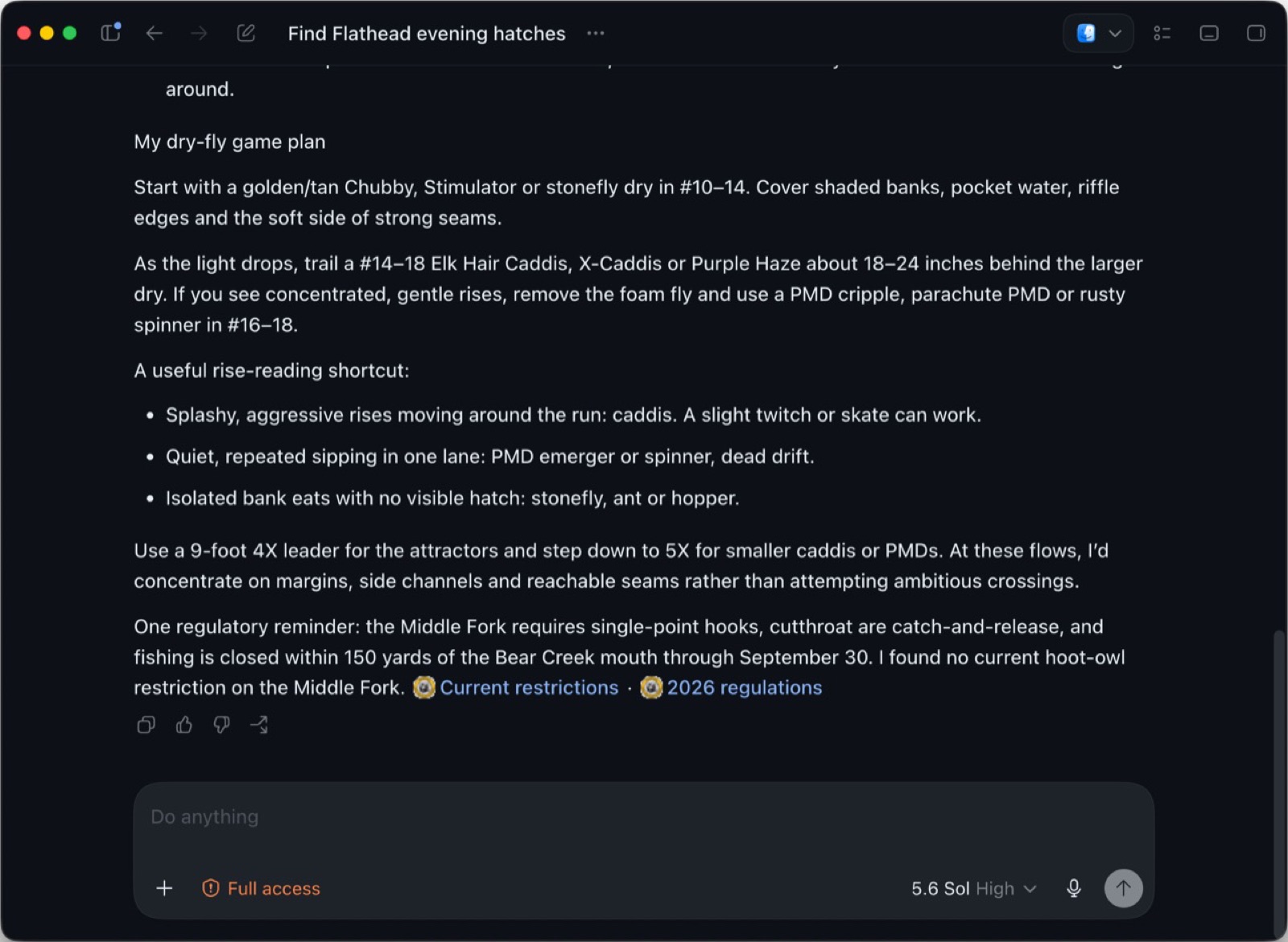
Before I went to the Middle Fork of the Flathead, I asked Codex for a fishing report. It recommended a few dry flies, including a Purple Haze.
Instead of checking another report or a hydrograph, I tied on the Purple Haze and caught fish almost every cast.
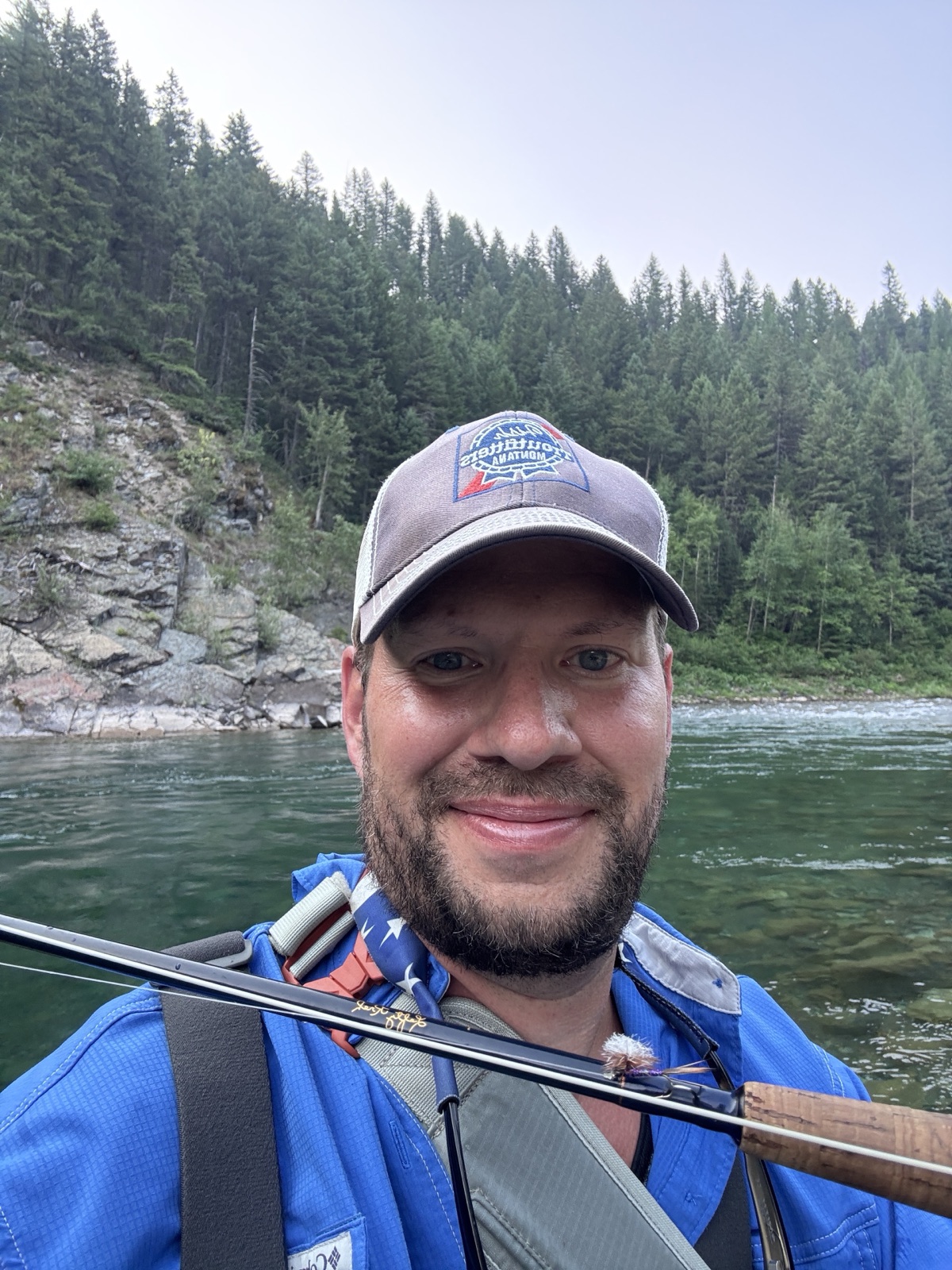
I had a 52-second vertical clip of me standing in the river talking about AI. Most of it was a longer analogy about what AI can and cannot do. Buried in the middle were the lines I wanted:
"Hear me out, Codex as a fishing report service."
"I have been catching fish left and right based on a fishing report that Codex prepared for me."
"That's like a size 14 Purple Haze."
"But it can't actually go out and cast the fly rod and hook the fish. You still have to go do that yourself."
I also had the report screenshot, a photo of the fly on my rod, river photos, and enough fish pictures to make the result pretty difficult to argue with.
The first prompt
I started the task from the ChatGPT mobile app and attached all ten photos. The source video lived in Google Drive.
This was the main instruction:
"Here's the media of when I used Codex to help me plan for a fly fishing outing on the Middle Fork of the Flathead. It recommended some dry flies to use, including a Purple Haze, which is in the screenshot."
"I want you to turn that into like a montage-style video, and then show the fly that I used, the fishing report, the fish, etc., as like a funny, kind of tongue-in-cheek style short video for my personal brand."
"Use the Hyperframe skill to do any sort of on-screen graphics, animations, etc., and look for the project folder in Codex that has all of the personal video assets for me. It's in GitHub somewhere."
That prompt supplied the story, the evidence, the tone, the format, and the source of the brand rules. It did not specify timecodes, a shot list, animation curves, or caption timing. Codex found those details in the source material.
What Codex assembled
The Drive video was 154 MB, too large for the connector's normal download path. Codex tried the shared link, hit Google's sign-in page, and then used my authenticated Drive session to retrieve the original file without shrinking it.
It found my a-makelky/aaron-video-assets repository and used the approved brand system at commit 66fd7344245da5e8ddc83340915cdbc51794a2ce.
That repo already defined the visual boundaries:
- Navy, blue, white, and teal
- Syne for display type and DM Sans for supporting text
- Flat color fields and restrained motion
- Four-pixel corners instead of rounded template cards
- No gradients, particles, bounce, glitch, fake dashboards, or generic AI imagery
- One teal accent group per frame
- Never cover my face, hands, or the evidence
Codex created a word-level transcript of the source clip and selected three audio sections:
| Final scene | Source time | Length |
|---|---|---|
| "Hear me out" opening | 35.18 seconds | 4.0 seconds |
| Fishing report and Purple Haze | 7.52 seconds | 12.6 seconds |
| What AI still cannot do | 25.84 seconds | 6.2 seconds |
It built the video as five HyperFrames compositions at 1080x1920:
- Me in the river with the opening line.
- The report, a tight Purple Haze focus, and the fly on my rod.
- A rapid sequence of fish photos.
- Me explaining that Codex still cannot cast the rod.
- The bent rod and the river with no added conclusion.
HyperFrames handled the timeline, graphics, photo choreography, transitions, captions, and final MP4 render. The project pinned HyperFrames 0.7.71 so it can be rendered the same way later.
The copy was wrong before the edit was right
The first draft tried too hard to sound like a social video. It used labels and compressed contrast lines like:
"AI CAN PLAN."
"IT CAN'T CAST."
"CODEX PICKED THE FLY."
It sounded like generic social copy, and my response was:
"Trash copy. Drop the field note copy, just do narrative style copy, not this pithy, stacotto copy"
That changed the on-screen story to three normal sentences:
"I asked Codex what fly to use on the Middle Fork."
"It told me to tie on a size 14 Purple Haze."
"I tied it on and started catching fish almost every cast."
The last two scenes had no story copy. My spoken line and the river were enough. We ran those sentences through my AI-writing audit. The final pass found zero LLM-style issues.
Mobile review changed the workflow
Codex initially gave me a localhost preview. That works when I am sitting at the Mac. I was not.
"I'm on mobile gpt remote, I can't see a localhost video. Share it with me in a medium I can view here"
From that point forward, each review came back as a small H.264 MP4 that played in the mobile app. The full-resolution master stayed separate.
That mattered because I could pause on a bad frame, take a screenshot on my phone, mark the problem, and send it back into the same task. I never opened the underlying timeline.
The feedback stayed visual
The early edit had a large blue panel over too much of the opening shot. I did not tell Codex which CSS property to change. I said:
"this blue background obscures too much of the frame. move it to the top above my hat, then lets add on brand captions in my brand style for all of the narrated speech"
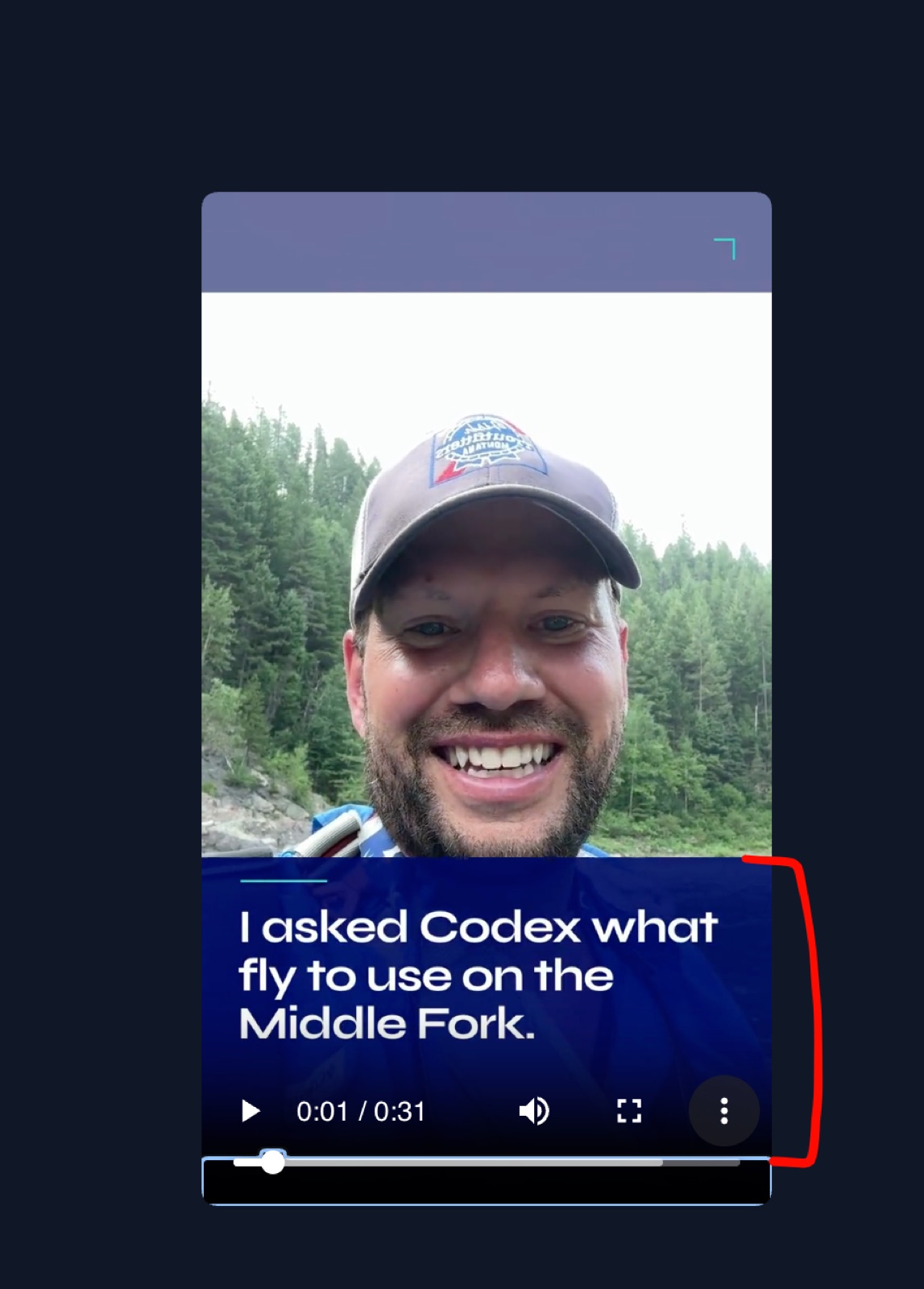
Codex moved the story sentence into the open sky above my hat and built phrase-level captions for the narration. It kept the captions separate from the story copy so the frame did not become one giant block of text.
Another scene had a teal line that looked intentional but pointed at nothing useful.
"this scene is poorly framed and the teal highlight obscures text. what is it's purpose? it should be focused in on 'Purple Haze', which is the fly i used the entire time and the one visible on my rod in the still image of me"
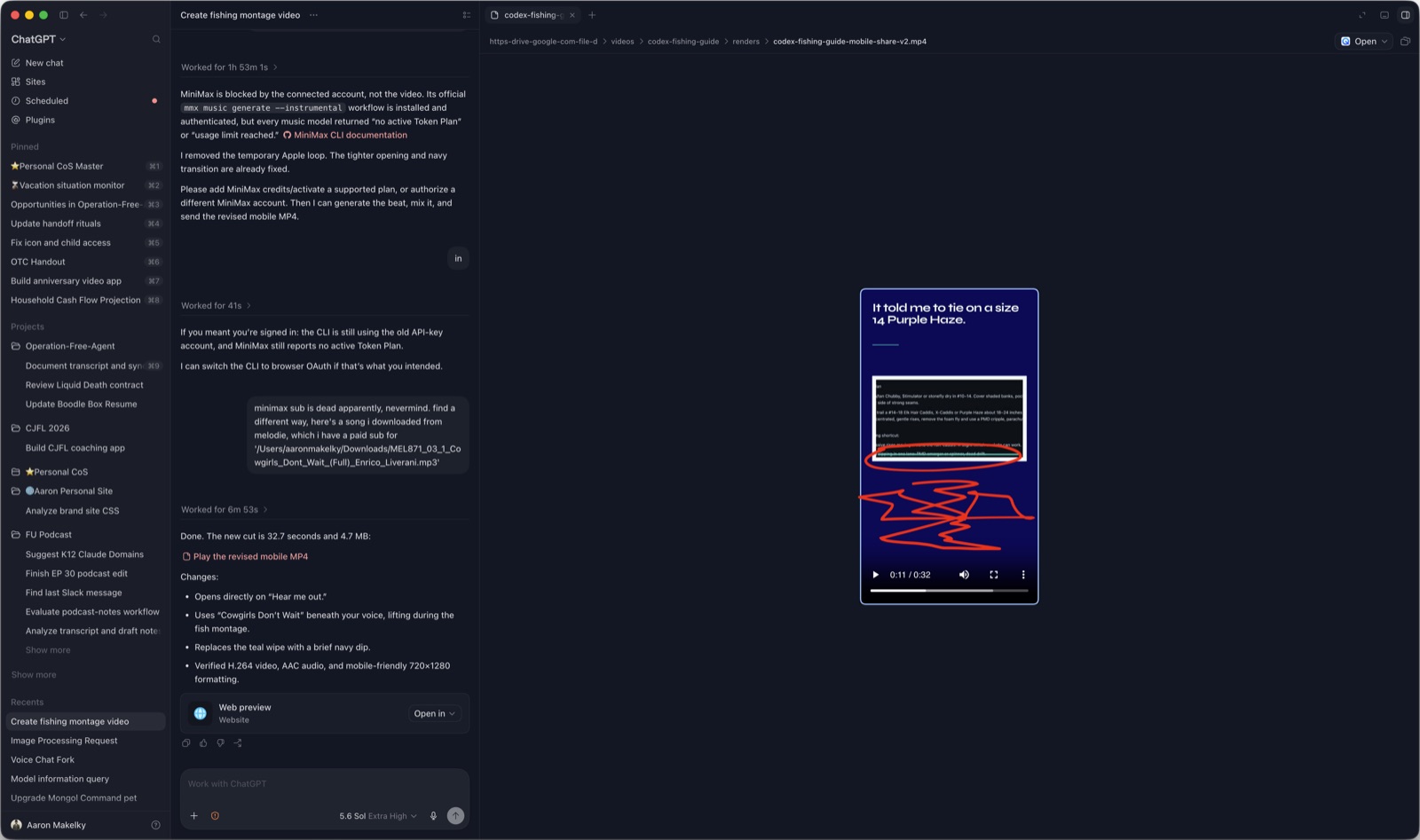
The scene was rebuilt around a simple visual argument:
- Show the actual Codex report.
- Focus on the exact words "Purple Haze."
- Cut to the same fly on my rod.
- Cut to the fish.
The teal accent finally had a job.
"Fix it and check your work"
The first attempt at the Purple Haze focus still missed. The box did not fit the words.
"this frame still misses the mark. the teal box doesn't fit the words 'Purple Haze' fix it and check your work"
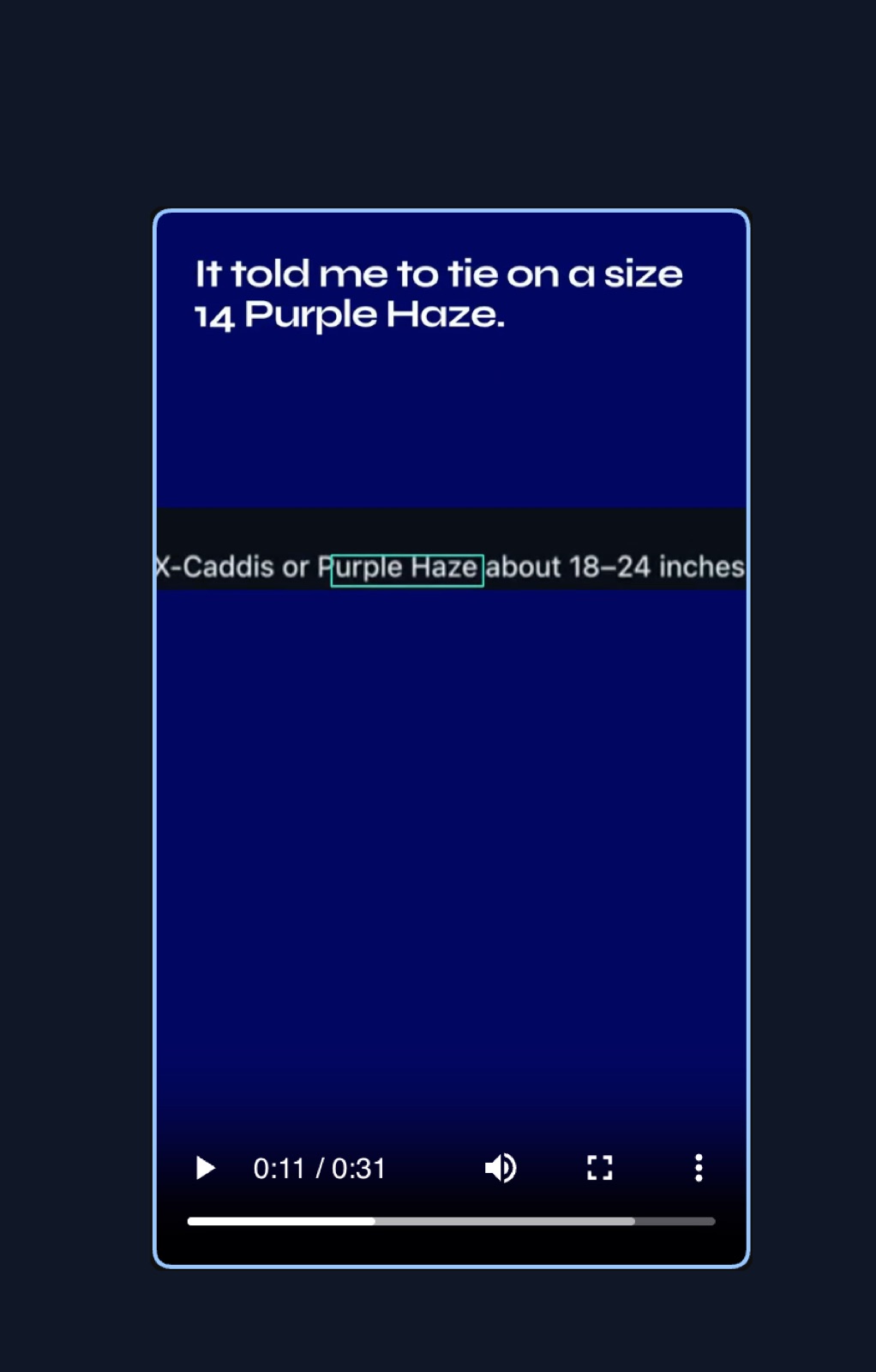
Codex changed the treatment so the box sized itself from the rendered words instead of using a guessed rectangle. A full-resolution check then found another problem: parts of the original screenshot lettering were peeking out behind the replacement.
The box padding and position were adjusted again. Codex captured the exact 10.5-second frame and used OCR to confirm where "Purple Haze" sat in the source image.
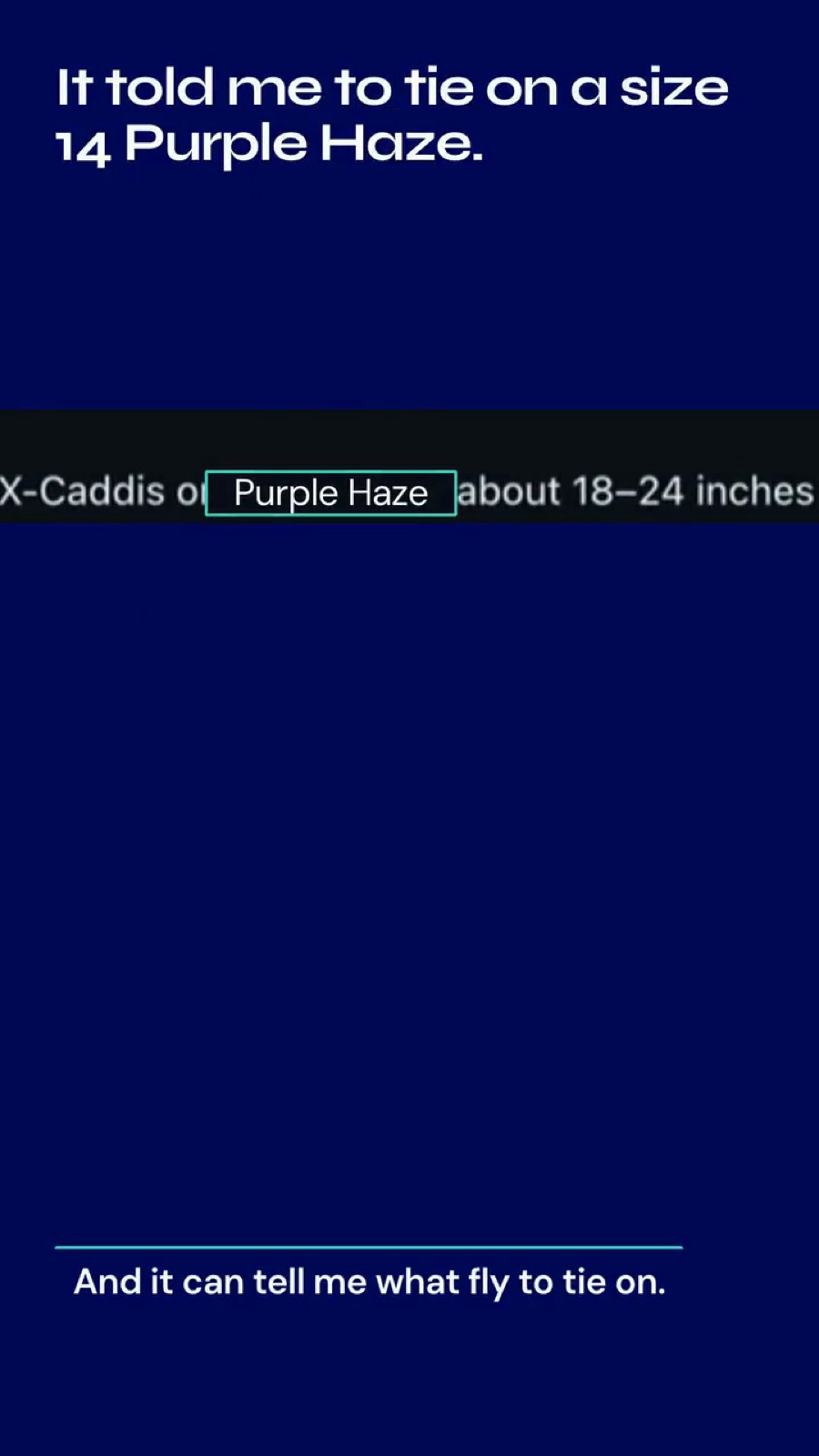
This is the part that tends to disappear from AI demos. The useful loop was:
- Render a review copy.
- Watch it on the device where I was actually working.
- Point to the specific miss.
- Change the project without rebuilding it from scratch.
- Render and inspect the exact frame again.
Tightening the audio
The first cut waited too long before the opening line. It also held about a second of silence after my final sentence.
"Too much dead air at the start, needs a simple background beat, and the teal highlighted frame doesn't make sense. What is it even highlighting?"
And later:
"there is also dead air at the end of my last line, cut it and tighten the edit"
Codex used the source waveform to find the last audible word and cut the shot 0.13 seconds after "yourself." The river ending starts immediately after it. The runtime dropped from 33.5 seconds to 31.7 seconds.
The music route failed
I asked Codex to use MiniMax CLI to generate a simple background beat.
The CLI was installed and authenticated, but the account returned "no active Token Plan" or "usage limit reached" for every available music model. There was no reason to keep retrying the same account.
I had a licensed track from my paid Melodie account, so I sent the local file path:
"minimax sub is dead apparently, nevermind. find a different way, here's a song i downloaded from melodie, which i have a paid sub for '/Users/aaronmakelky/Downloads/MEL871_03_1_Cowgirls_Dont_Wait_(Full)_Enrico_Liverani.mp3'"
Codex cut a 31.7-second cue from "Cowgirls Don't Wait" by Enrico Liverani. It mixed the track quietly under my voice, raised it during the silent fish sequence, ducked it before the final spoken line, and faded it under the last river image.
The generated-music tool failed, so we used the licensed music I already owned.
How the video was checked
The final review went beyond confirming that the render completed.
HyperFrames checked the project for runtime errors, broken layout, motion problems, safe-area collisions, and contrast issues at eight points across the timeline.
Codex also generated contact sheets and inspected the important frames at full resolution:
- Opening story copy above my hat
- Full fishing report
- Purple Haze focus at 10.5 seconds
- Purple Haze visible on the rod
- Fish sequence
- Caption placement during both talking-head sections
- Final river frame with no copy
The full master was rendered at 1080x1920. A smaller 720x1280 H.264 copy was made for review in the ChatGPT mobile app. FFmpeg handled the mobile encoding, and FFprobe verified the duration, dimensions, H.264 video, and AAC audio.
One project, two delivery versions
After publishing the captioned version on X, I wanted a second file for Instagram and TikTok with no background music and no narration captions. I planned to add those inside the social apps.
"I need you to make a duplicate version of the video, but no background music and no captions. I will add those in natively on some video social media apps."
Codex added a reusable nativeSocial export switch to the HyperFrames project. It did not delete anything from the original.
The normal render keeps the licensed music and branded captions. The native-social render removes both while preserving my voice, river audio, story graphics, and timing.
Codex verified that speech remained audible and that the fish montage and closing section were digitally silent where the music had been removed.
When I said I needed the full-resolution file on my iPhone, Codex uploaded the 1080x1920 master to Google Drive and sent the download link back into the chat.
The reusable version
This is the starting prompt I would use again:
Here is one source video and a folder of supporting screenshots and photos.

Build a vertical social video from the strongest spoken lines in the source.
Use the real footage as the narrative spine and treat the screenshots and
photos as evidence, not decoration.

Use my canonical personal video brand system.
Use HyperFrames for the edit, on-screen graphics, captions, transitions,
photo timing, and render.

Keep the source voice and ambient sound. Do not generate a voice or use
generic B-roll. Use simple narrative copy in first person. No labels,
slogans, fake dashboards, or retention-editing effects.

Create a lightweight review MP4 I can play in the ChatGPT mobile app.
After each revision, inspect the exact frames I flag and run the full
HyperFrames check before rendering again.

Deliver:
1. A 1080x1920 master with branded captions and licensed music.
2. A second 1080x1920 version with no music and no captions for native
   social publishing.
3. Mobile-friendly review copies.
4. A project brief, storyboard, transcript, and final delivery notes.
The final thing I asked for was not another creative revision. It was a full-resolution version I could download on my phone, then a clean duplicate for native captions and music.
Codex made both and put the master in Drive.