Field notes
My video review notes live in GitHub now
· 6 min read
AI Video Editing · AI Rabbit Holes · GitHub · Open Source
"ryan gets cut off before finishing "$10 a month""
That's a note I typed at 0:25.4 on clip 2 of this week's AI Rabbit Holes batch, in lowercase, with the clip paused. It's also a file in a GitHub repo now.
How the clips get made
Ryan Doser and I record AI Rabbit Holes in Riverside. When we're done, I export the timeline, which comes down as a zip. This week's was 18.5 GB:
- two 4K camera files, mine at 9.2 GB and Ryan's at 8.2 GB
- a WAV for each of our mics
- the screen share, 415 MB
exportedTimeline.xml, a 60 KB timeline file at 24 fps, in the XML format Final Cut and Premiere read
Every camera clip in it starts at the same point it starts in the session, so a timestamp in the transcript is the same timestamp in both camera files. Word timings come from Riverside's transcript, down to the millisecond.
So nothing gets unzipped. Back on October 15 I had about 1.5 GB free on this Mac, and that week's export was 17 GB. The clip pipeline reads just the seconds it needs for each clip straight out of the zip and copies those frames as they are, without re-compressing them.
From there it's ten vertical clips per episode, each one going through a few versions. Clip 2 went to v4.
The problem was the notes
Ten clips, three or four versions each, and every version needs me to watch it and say what's wrong. My notes used to go to my editor as chat messages, with no timestamp and no version attached.
I wanted the Frame.io thing. Pause the video, type the note, and it sticks to that exact second of that exact version.
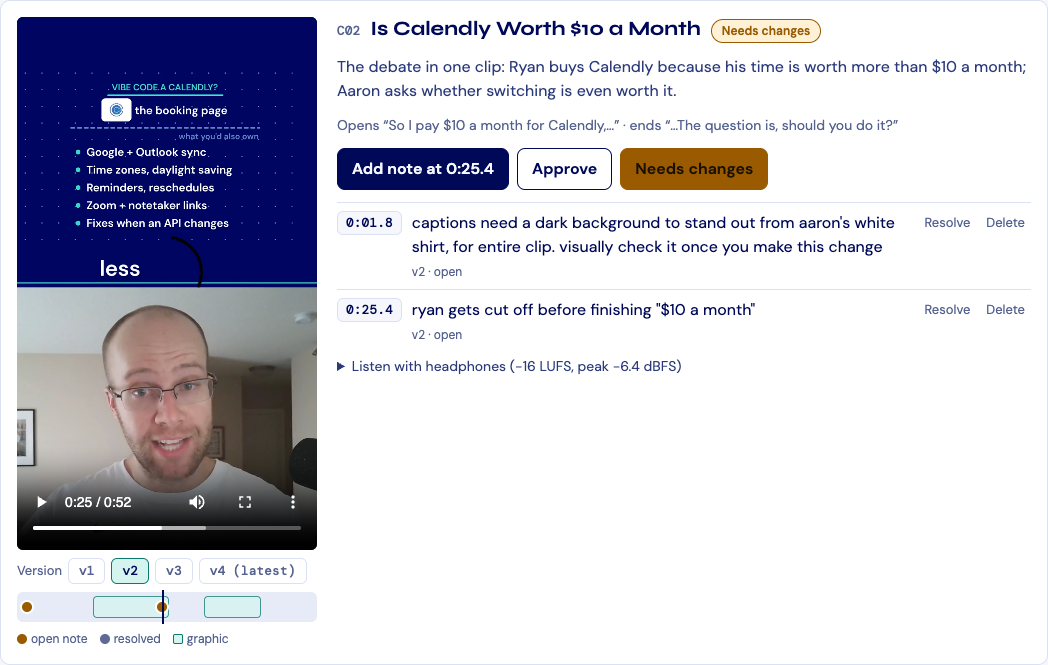
The first version I built did that. It was a web page with every clip, a version switcher, and an "Add note at 0:25.4" button that follows the playhead. But the notes lived in a database that only one AI tool could read. I want any of my agents to be able to fix a clip, and I want Ryan to see the notes in the same place I do.
So I moved them into the repo.
Every note is a file
Each note is one JSON file. Here's the one from the top of this post:
{
 "id": "0mywi67m7sy3h2w684u3",
 "clip": "C02",
 "version": "v2",
 "t": 25.4,
 "text": "ryan gets cut off before finishing "$10 a month"",
 "status": "open",
 "by": "Aaron Makelky"
}
When I save a note, the desk commits it to git under my name with a message like Review note on C02 v2 at 0:25.4. I run it with --push, so it goes straight up to GitHub. Approvals work the same way, one file per clip. Since every note is its own file, two people can leave notes at the same time without a merge conflict.
Anything that can read a repo can read my notes now: me on github.com, Ryan, a script, Codex, Claude Code. They all run the same command to see what's open, desk.py notes --open:
0mywi67m7sy3h2w684u3  C02 v2 0:25.4  [open] ryan gets cut off before finishing "$10 a month"
mlperb51n74zhb1sn3k2  C02 v2 0:01.8  [open] captions need a dark background to stand out from aaron's white shirt, for entire clip. visually check it once you make this change
To check that I wasn't kidding myself, I gave Codex the repo and nothing else. It found the tool, listed both open notes on clip 2, added a test note on clip 5 at 0:12.0, and marked it resolved. The note showed up on the review page while I had it open, labeled "Codex", without a reload. (I deleted the test note afterwards.)
What my two notes on clip 2 actually fixed
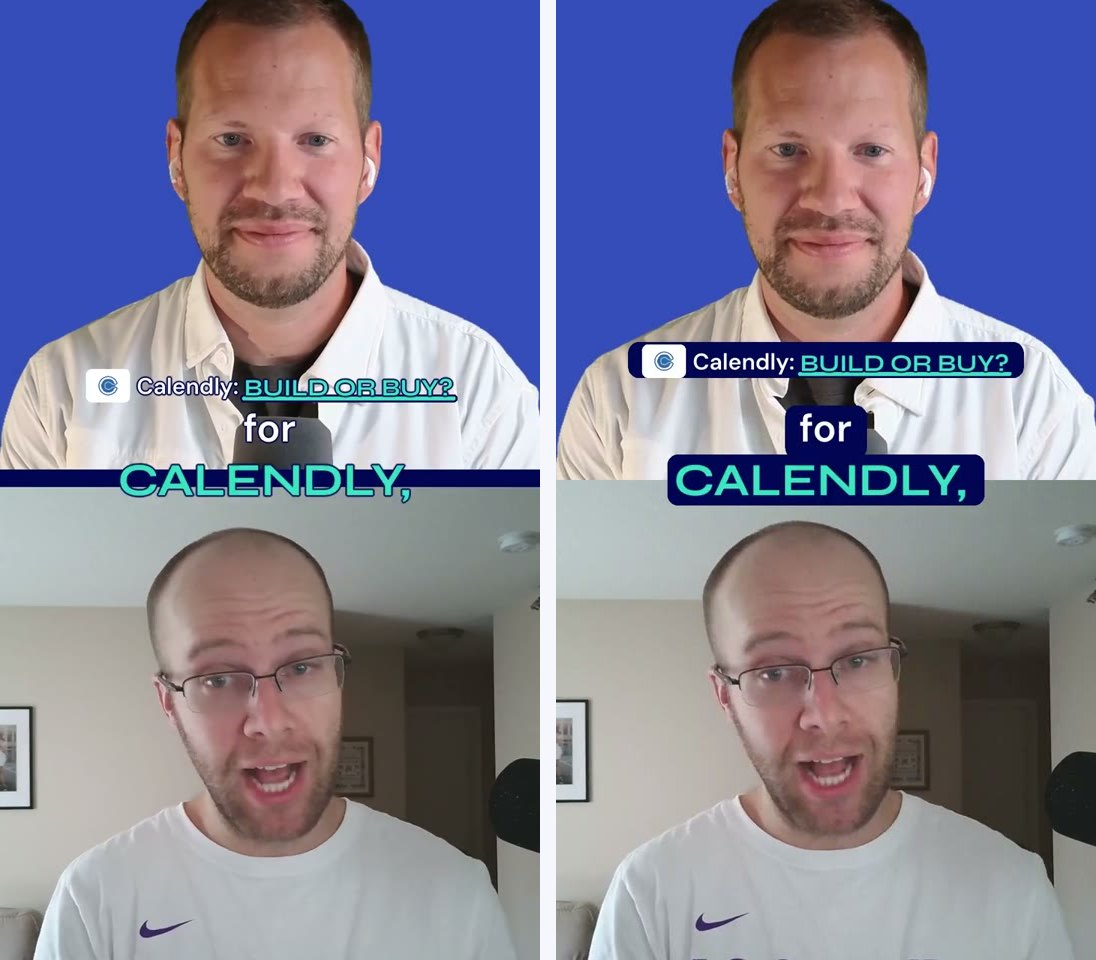
0:01.8: the captions
I wear a white shirt. The captions are white. In v2 (left) the opening line and the first caption sat right on my chest. v4 (right) puts a navy plate behind every caption and the opening hook, for the whole clip.
0:25.4: Ryan getting cut off
Riverside's transcript says Ryan's "month." ends at 521.565 seconds into the session. His mic says otherwise: the "th" and the tail of the word keep going until about 521.89, and it doesn't go quiet until around 522.0. The cut was at 521.705, so it chopped the last 190 milliseconds of the word.
The pipeline also turns the gaps between words down by 14 dB so breaths stay quiet (breath ducking). It trusted the transcript's end time, so it started turning Ryan down while he was still saying "month."
v4 moves the cut to 522.045, after his mic goes quiet and before his next word starts at 522.187. The breath ducking now waits until the mic actually drops instead of trusting the transcript. The clip got 0.34 seconds longer.
Going back over the other nine clips turned up four more cuts with the same shape, where the mic keeps going 350 to 390 ms past the cut. None of them had a note yet.
Phone, too
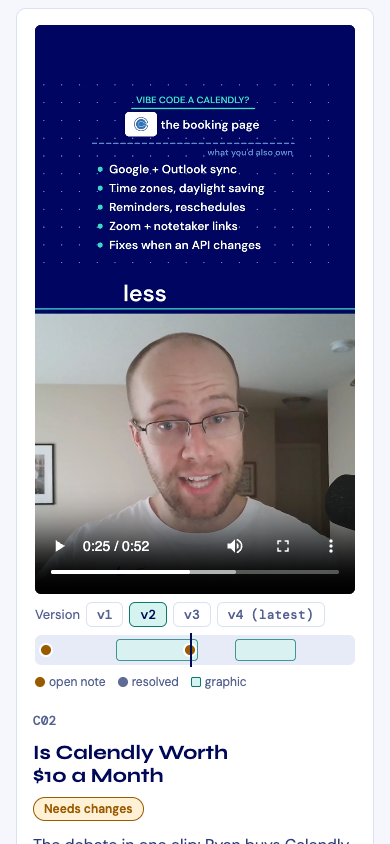
The desk runs on my Mac. Start it with --lan and my phone can open it over Wi-Fi. Same page, stacked into one column:
Try it
It's open source, MIT licensed: github.com/a-makelky/video-review-desk
It's one Python file. It needs Python 3.9 or newer (on a Mac, Apple's Command Line Tools include it) and nothing else. The repo comes with an example project:
git clone https://github.com/a-makelky/video-review-desk
cd video-review-desk
python3 desk.py --project example serve
Then open http://localhost:8765/. For your own videos, put the renders in a media folder named like hook-v1.mp4 and hook-v2.mp4, then run python3 desk.py init review --media media. It builds the clip list for you.
The version on GitHub is the same code I use on AI Rabbit Holes. When I change it in my project, the public repo picks up the change.
Clip 2 v4 is sitting on the desk right now with both notes still open...