I made Cursor file my meeting notes. Here is the version for your setup.
Wispr, Gemini, and Zoom keep the notes on their servers. I run a Cursor Cloud job every day at 6:15 PM Mountain that copies new ones into my Obsidian vault as markdown. Fill in your apps and copy the prompt.
Wispr has the notes. The vault did not.
This page does not log into your apps. It writes the prompt. You paste it into an agent that already has access.
01
The notes sit in someone else's cloud
Wispr, Gemini, Zoom. Fine until the export is ugly or the app changes.
02
My other agents cannot see them
If a meeting is not in the vault, it might as well not exist.
03
I do not want a laptop staying on
I used to run this as a Codex job on my Mac. Cursor Cloud does it with the lid closed.
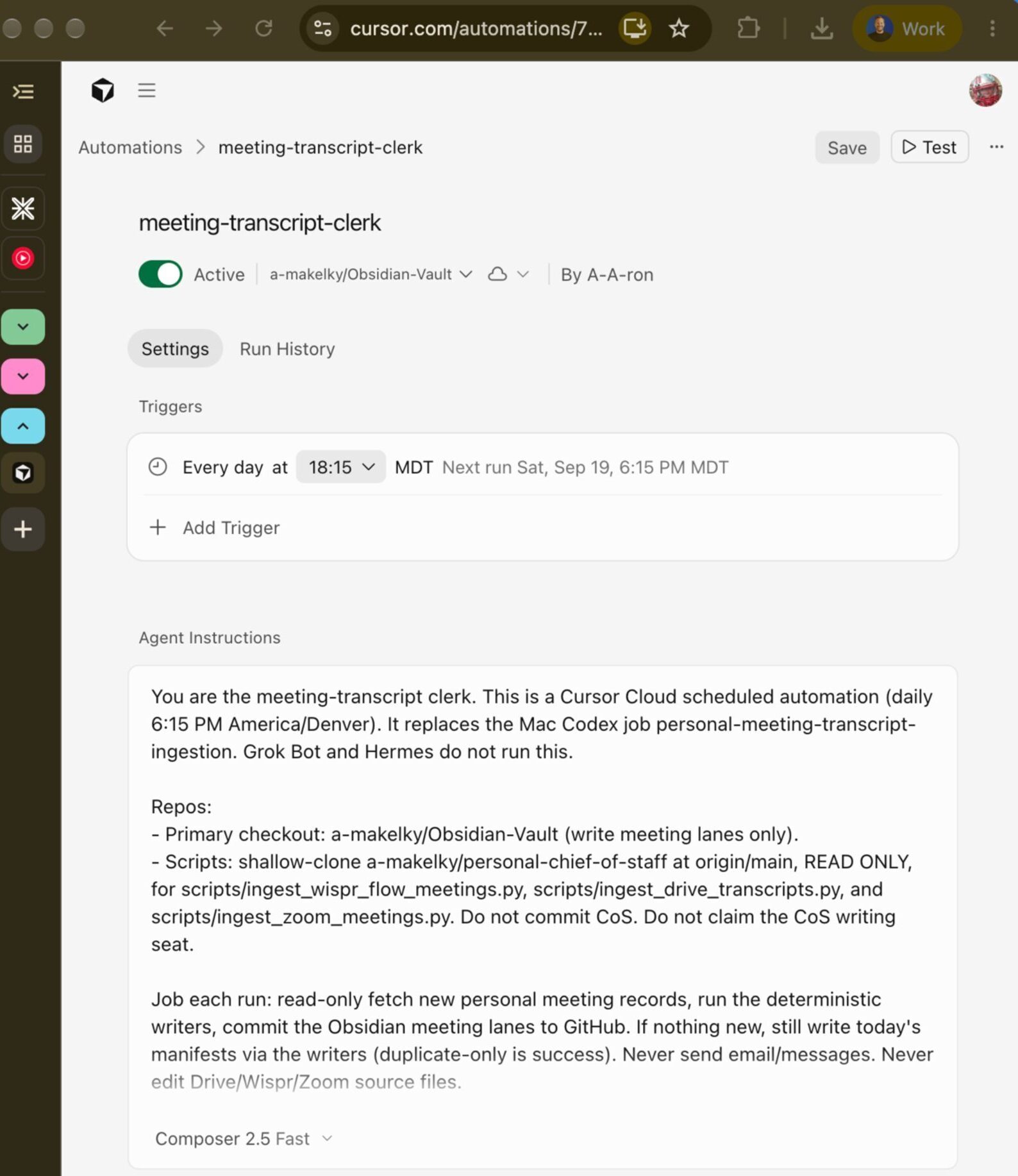
meeting-transcript-clerk, running daily.
6:15 PM Mountain on Composer 2.5 Fast. Active.
Settings tab. Trigger at 18:15 MDT. Agent Instructions holds the prompt.
Cursor Cloud, on a schedule.
Claude Code, Codex, and GitHub Actions can run the same prompt if that is what you already have.
01
Create an Automation in Cursor
Open Automations and make a scheduled agent. I named mine meeting-transcript-clerk. Connect the repo where notes should land. Mine is a GitHub-backed Obsidian vault.
02
Set the time and paste the prompt
I use 6:15 PM Mountain and Composer 2.5 Fast. Paste into Agent Instructions, then Save.
03
Hit Test, then check Run History
After it finishes, look under Agent-Memory/<source>/raw/ in the repo. If a connector was missing, the report should say so. Do not invent a transcript.
If you want a hand pointing this at a vault you already have
Bring the apps you use. We can walk the first run.